LightBlog

lundi 3 janvier 2022

Samsung Galaxy S21 FE Hands-On: Keeping the Galaxy S21 alive

The Galaxy S20 series was one of Samsung’s best-selling phone ranges, and part of that success was down to the Galaxy S20 FE. Dubbed the Fan Edition (or FE for short) – a throwback to the rebuilt Galaxy Note 7 Fan Edition – Samsung sold over 10 million Galaxy S20 FE units in the past year since its launch in Q4 2020. At CES 2022, Samsung launched the next generation of the Fan Edition – the Galaxy S21 FE.

The Galaxy S21 FE brings the best of the Galaxy S21 range at a lower starting price than the Galaxy S21 range, and crucially, unlike its namesake series, this will be a phone that is sold for the next year at least. Available in four colorways with a premium matte textured feel, the Galaxy S21 FE will likely offer everything you could want in a Galaxy smartphone, and especially if the upcoming Galaxy S22 series doesn’t cut it for you.

At an exclusive event earlier at CES 2022 in Las Vegas, we went hands-on with the Galaxy S21 FE.

If you know anything about the Galaxy S21 series, chances are you’ll know most of the specs and features found in the Galaxy S21 FE. That said, one thing that’s immediately clear is how nice this phone feels in the hand. The matte textured rear offers grip, is ergonomically friendly, and looks fantastic, especially in the lavender color which is slightly more saturated than the namesake color found on the Galaxy Z Flip 3.

The design language of the Galaxy S21 FE is almost identical to the Galaxy S21 series, with the same contour-cut design resulting in a slightly raised camera hump – albeit, less so than the main phones in the series. The frame of the phone is an aluminum build but it still retains the premium feel that the Galaxy S21 series offered.

There are four color options for the Galaxy S21 series, and by far my favorite is the lavender. It is virtually the perfect shade of purple and it’s a better colorway than the Galaxy Z Flip 3. The other color options include an Olive green, which is very similar to the same in the Galaxy Buds 2, Black and White. If you’ve seen the Galaxy Buds 2 colors, you’ll know the Galaxy S21 FE colors.

Beyond the design similarities, the Galaxy S21 FE features many of the same specs found on the Galaxy S21 series. On paper, it’s best described as a combination of the Galaxy S21 and Galaxy S21 Plus, and given it’ll replace these two devices in Samsung’s ongoing lineup, it makes sense that Samsung would build a hybrid device featuring the best of these two phones.

It features a 6.4-inch FHD+ Dynamic AMOLED 2X Display which is bigger than the Galaxy S21 (6.2-inches) and smaller than the Galaxy S21 Plus (6.7-inches), albeit with the same resolution and display technology. Like the rest of the Galaxy S21 series, the Galaxy S21 FE display supports a 120Hz refresh rate for smooth scrolling, HDR10+, and an Always On Display. It also features the latest protection from Corning – Gorilla Glass Victus.

In the US, the Galaxy S21 FE is powered by a Snapdrag0n 888 processor whilst in some countries, it’s likely to use an Exynos processor. There are two storage and memory options; the base model comes with 6GB of RAM and 128GB of internal storage, whilst the premium variant features 8GB of RAM and 256GB of storage.

The triple camera setup features the same wide and ultra-wide cameras from the Galaxy S21 and S21 Plus, although the telephoto camera takes a fairly substantial hit. The main camera is a 12MP wide sensor with dual pixel autofocus, Optical Image Stabilization, whilst the ultra-wide is a 12MP sensor with 120° field of view, f/2.2 aperture, and 1.4µm pixel size. The telephoto camera is cut from the 64MP sensor found previously to an 8MP sensor, albeit it still supports 30x digital zoom.

The rest of the specs are fairly standard with a 4,500 mAh battery powering the entire package, which can be topped up using either 25W wired charging or 15W wireless charging. There’s also reverse wireless charging to recharge your accessories, a range of 5G bands and sensors, and IP68 water and dust resistance. The Galaxy S21 FE also launches running One UI 4 on top of Android 12.

The Galaxy S21 FE launches next week for $699.99 for the base variant, whilst the premium variant with 8GB of RAM and 256GB of storage will cost you $769.99. It’ll be available from a range of carriers and from Samsung directly, and presumably, there’ll be plenty of trade-in deals to further reduce the cost of the phone.

Galaxy S21 FE lavender color Galaxy S21 FE colors Galaxy S21 FE colors Galaxy S21 FE all colors Galaxy S21 FE graphite color Galaxy S21 FE olive color

Overall, the Galaxy S21 FE is designed to replace the existing Galaxy S21 range in Samsung’s lineup, especially as the latter is mostly out of stock already. With Samsung planning to launch its next range of phones in the coming months at a higher price, the Galaxy S21 FE is designed to be the phone that keeps the legacy of the Galaxy S21 series alive, and in this, it seems to deliver. Stay tuned as we’ll have a full review of the Galaxy S21 FE going live in the coming weeks.

    Samsung Galaxy S21 FE
    The Galaxy S21 FE is Samsung's latest affordable flagship phone for the masses. It provides a flagship experience at a lower price.

The post Samsung Galaxy S21 FE Hands-On: Keeping the Galaxy S21 alive appeared first on xda-developers.


from xda-developers https://ift.tt/3Hs6X62
via IFTTT

LG reveals its 2022 smart TV lineup and webOS 22 update

LG is one of the most popular manufacturers of TVs, and the company’s lineup of WebOS-powered smart TVs is usually on par (or slightly ahead of) competing options from TCL, Samsung, and other big names. It wouldn’t be a CES week without some new smart TVs, and sure enough, LG has announced its 2022 smart TV lineup and some updates for its webOS software.

First up is the LG 2022 G2 series (not to be confused with the LG G2 smartphone), which is the company’s top-tier option with OLED panels. Just like last year, there are 55-inch, 65-inch, 77-inch models sizes available, but LG is now throwing a 97-inch model into the mix. All of them have LG’s OLED Evo technology, which aims to deliver more realistic image quality.

2022-OLED-evo-C2

2022 C2 77-inch TV

There’s also the slightly-cheaper C2 series, which will be available in 48-inch, 55-inch, 65-inch, 77-inch, and 83-inch sizes. Some of these will have OLED Evo screens too, and all of them have thinner bezels. Most C2 and G2 models are equipped with the company’s latest “Alpha 9 Gen 5” processor, but LG didn’t specify any improvements beyond the ability to create virtual 7.1.2 surround sound. Finally, LG also has a few new QNED TVs for 2022.

This year’s TVs will ship with a new version of webOS, which LG is calling ‘webOS 22’ — the current version is 6.0, but it seems LG wants to synchronize the version numbers with the current year. The new update introduces personal profiles, so each person using the TV can set up their own favorites and content recommendations. You’ll be able to switch profiles through the TV interface, or through something LG calls ‘NFC Magic Tap.’ The new update also allows the TV to function as a controller for devices using the Matter standard, starting sometime in the second half of 2022.

LG did not share pricing or availability details on any of its new TV models.

The post LG reveals its 2022 smart TV lineup and webOS 22 update appeared first on xda-developers.


from xda-developers https://ift.tt/3sUZetp
via IFTTT

The new Galaxy S21 FE looks to be a better deal than the flagship Galaxy S21

After what seems like an eternity, Samsung has finally lifted the covers off the highly-anticipated Galaxy S21 FE. As we saw in numerous leaks over the last few months, Samsung’s latest Fan Edition device is a trimmed-down version of its flagship Galaxy S21. It offers quite a few of the same features as the flagship model, including a flagship SoC, a respectable camera setup, a high refresh rate display, and a big battery, at a slightly more affordable price. But is it worth getting over a deeply discounted Galaxy S21? Let’s quickly take a look at what Samsung’s new affordable flagship has to offer.

Since the Galaxy S21 FE is essentially a more affordable Galaxy S21, we’ll start with taking a look at their hardware. Check out the table below for a quick comparison of the new Galaxy S21 FE and the flagship Galaxy S21.

Samsung Galaxy S21 FE vs. Galaxy S21

Specification Samsung Galaxy S21 FE Samsung Galaxy S21
Build
  • Plastic back
  • Metal frame
  • Plastic back
  • Aluminum mid-frame
Dimensions & Weight
  • 155.7 x 74.5 x x 7.9mm
  • 177g
  • 151.7 x 71.2 x 7.9mm
  • 171g
Display
  • 6.4-inch FHD+ Dynamic AMOLED 2X flat display
  • 2340 x 1080p
  • 120Hz refresh rate
  • 240Hz touch sampling rate in Gaming Mode
  • 6.2-inch FHD+ Dynamic AMOLED 2X
  • 2400 x 1080p
  • 120Hz refresh rate
  • 240Hz touch sampling rate
SoC Qualcomm Snapdragon 888
  • International: Exynos 2100
  • USA: Qualcomm Snapdragon 888
RAM & Storage
  • 6GB + 128GB
  • 8GB + 256GB
  • 8GB LPDDR 5 + 128GB
  • 8GB + 256GB
Battery & Charging
  • 4,500mAh
  • 25W wired fast charging support
  • 15W wireless charging support
  • Reverse wireless charging support
  • 4,000mAh
  • 25W fast charging support
  • 15W wireless charging support
  • Reverse wireless charging support
Security Optical in-display fingerprint sensor Ultrasonic in-display fingerprint scanner
Rear Camera(s)
  • Primary: 12MP f/1.8, Dual Pixel AF, OIS
  • Ultra-wide: 12MP f/2.2, 123° FoV
  • Telephoto: 8MP f/2.4, 3x optical zoom, 30x space zoom, OIS
  • Primary: 12MP f/1.8, Dual Pixel AF, OIS
  • Ultra-wide: 12MP f/2.2, 120° FoV
  • Telephoto: 64MP f/2.0, PDAF, OIS
Front Camera(s) 32MP f/2.2 10MP f/2.2, Dual Pixel AF
Port(s) USB Type-C USB 3.2 Type-C
Audio
  • Stereo speakers
  • Dolby Atmos
  • Stereo speakers tuned by AKG
  • Dolby Atmos
Connectivity
  • Sub6/mmWave 5G
  • 4G LTE
  • Dual-band (2.4GHz + 5GHz) Wi-Fi 802.11 a/b/g/n/ac/ax
  • Bluetooth
  • Sub6 5G
  • 4G LTE
  • Dual-band (2.4GHz + 5GHz) Wi-Fi 802.11 a/b/g/n/ac/ax
  • Bluetooth 5.1
Software One UI 4 based on Android 12 One UI 4 based on Android 12
Other Features Samsung Pay with NFC Samsung Pay with NFC

As you can probably tell from looking at the spec table above, the Galaxy S21 FE isn’t all that different when compared to the flagship Galaxy S21. It offers pretty much all the features found on the flagship device, including a Qualcomm Snapdragon 888 chip, up to 8GB RAM, up to 256GB onboard storage, and the same connectivity features. However, the two phones aren’t exactly the same. In fact, the Galaxy S21 FE does a few things better.

Samsung Galaxy S21 FE display on white background

For instance, the device has a larger 6.4-inch FHD+ 120Hz Dynamic AMOLED 2X display, which some people might prefer over the vanilla Galaxy S21’s 6.2-inch FHD+ 120Hz Dynamic AMOLED 2X display. It even has a larger 4,500mAh battery that offers the same fast charging capabilities as the flagship model. On top of that, the new phone has an arguably better 32MP selfie shooter. But while the Galaxy S21 FE looks to be better than the regular Galaxy S21 in these three areas, Samsung has cut some corners to keep its price low.

Galaxy S21 FE camera module close up on white background

Speaking of cutting corners, the new Galaxy S21 FE doesn’t get the same telephoto camera as the flagship model. While you do get a 12MP primary camera and a 12MP ultra-wide camera on the device, you don’t get a 64MP telephoto camera. Instead, the device features a more modest 8MP telephoto camera with 3x optical zoom and 30x space zoom.

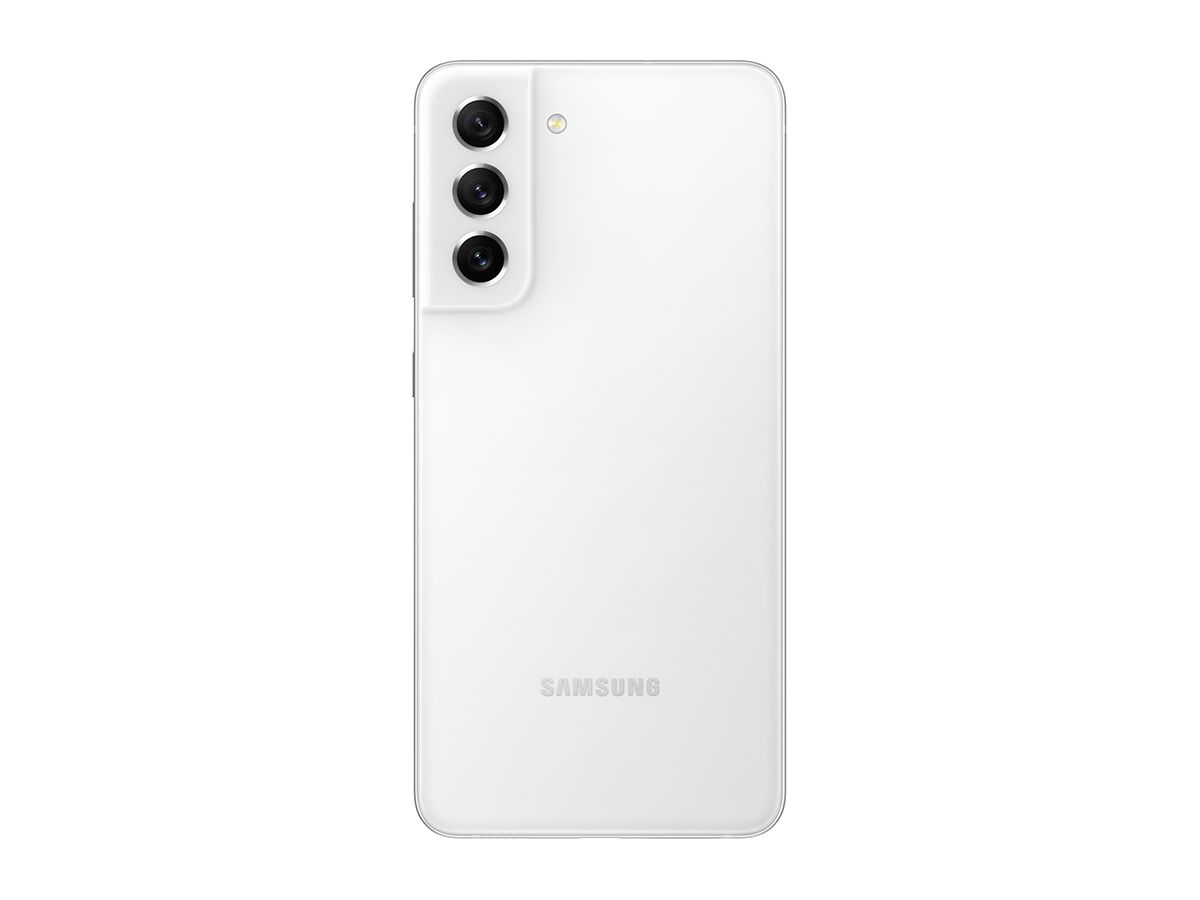
Lavender Galaxy S21 FE on white background Olive Green Galaxy S21 FE on white background White Galaxy S21 FE on white background

The Galaxy S21 FE also doesn’t get the same ultrasonic in-display fingerprint scanner as the flagship model, and it opts for a more mainstream optical in-display fingerprint scanner. But that might actually be a good thing because my experience with the ultrasonic fingerprint sensors on other Samsung devices hasn’t been all that great. They’re a bit too sluggish compared to the optical fingerprint scanners that the company offers on cheaper devices.

Since Samsung hasn’t shared the complete RAM, storage, and USB specifications for the Galaxy S21 FE yet, we’re not sure if it offers the same hardware as the flagship model. It is possible for Samsung to have opted for slower components on the Fan Edition model to keep its price low, but you’ll have to wait for our full review to know if that’s the case or not.

All color variants of the Galaxy S21 FE on white background

All in all, the Galaxy S21 FE packs some impressive hardware at its price point and it has the potential to replicate the Galaxy S20 FE’s success. However, since it’s hitting the market after a long delay, Samsung might not get the same results as last year.

One good thing about the delay, though, is that the Galaxy S21 FE ships with One UI 4 based on Android 12 out of the box. This means that it will get an additional Android OS upgrade and an extra year of security updates, which slightly increases its chances of attracting buyers. Another thing that we’re sure will pique your interest in the Galaxy S21 FE is its price. Check out the section below for more details.

Pricing & Availability

The Samsung Galaxy S21 FE will be available in four colorways — Black, White, Olive Green, and Lavender — and it will go on sale starting January 11. Although it offers pretty much all the features that you get with the $800 Galaxy S21, it starts at $699 for the base 6GB + 128GB model. If you’re wondering if the Galaxy S21 FE is worth the given price or not, make sure you stay tuned for our full review.

What do you think of the new Galaxy S21 FE? Would you get it over other similarly priced phones? Let us know in the comments section below.

The post The new Galaxy S21 FE looks to be a better deal than the flagship Galaxy S21 appeared first on xda-developers.


from xda-developers https://ift.tt/3mViTW9
via IFTTT

This is the OnePlus 10 Pro, and it launches soon in China

Love it or hate it, there’s no denying that OnePlus still produces smartphones that impress a lot of people. The brand has traded some of its old-school enthusiast leanings in favor of mainstream audience appeal, and that has worked in its favor. With 2022 underway, it’s time for another set of smartphone releases, and the company is ready with its flagship for the year. This is the OnePlus 10 Pro, and it is launching in China next week.

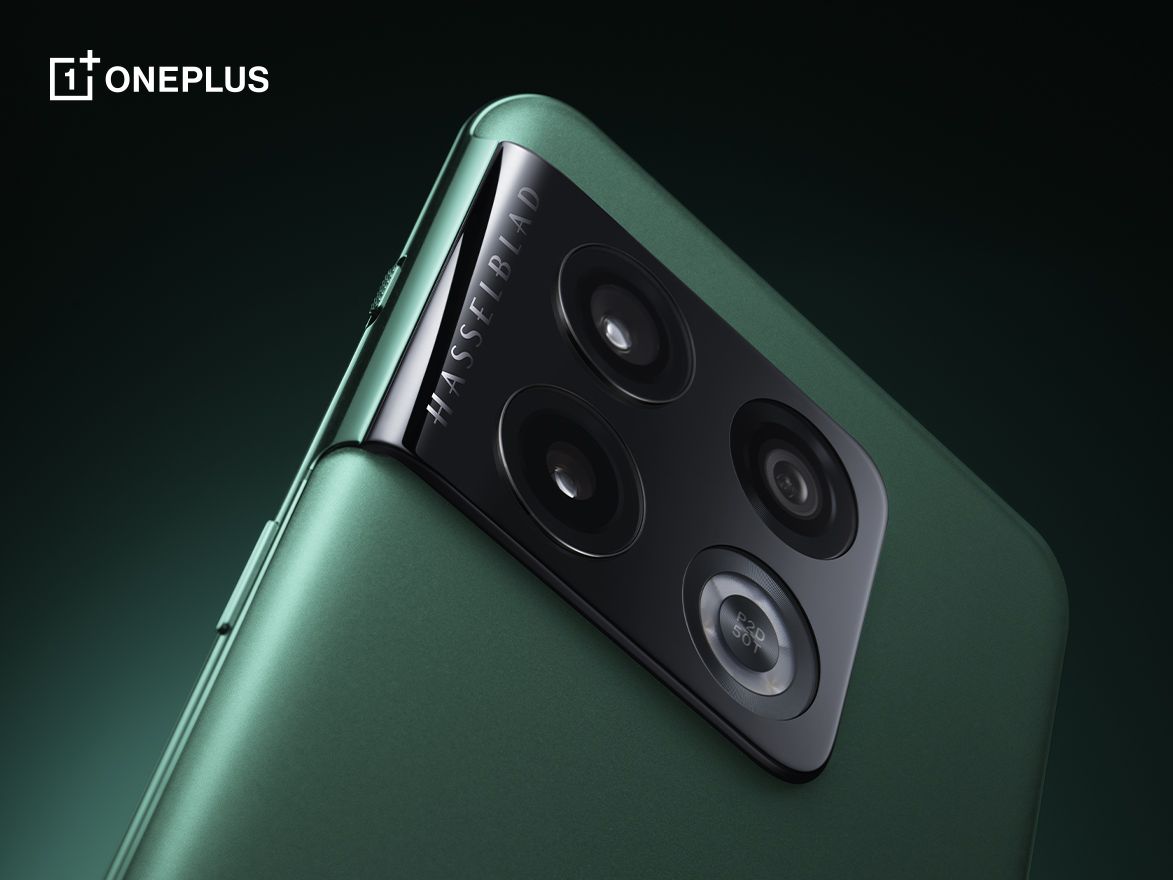
OnePlus 10 Pro in Green

OnePlus has finally officially revealed that the OnePlus 10 Pro is launching in China on Tuesday, January 11, 2022. Along with the launch announcement, the company has also shared official marketing renders of the device in its Green and its Black colorway.

OnePlus 10 Pro in Black

As you can see, the OnePlus 10 Pro is very similar to what we had seen in the leaked renders in the run-up to this announcement. Note that none of the renders from OnePlus show off the front of the device, but we aren’t really expecting any massive surprises there anyway. What is also missing is any mention of the regular OnePlus 10 — the announcement specifically mentions the OnePlus 10 Pro and not OnePlus 10 series as the company has done in the past, indicating that we may be seeing only one phone at the Chinese launch event.

What remains distinct about the OnePlus 10 Pro is the camera island, which is reminiscent of the Galaxy S21’s camera island. The Hasselblad logo finds a prominent spot on this generation too. We are pleased to see OnePlus giving up on the idea of a fourth-but-practically-useless tertiary rear camera, as the fourth spot houses the LED flash. One can also spot the alert slider on the side. On the Black color variant, we can see what looks like a Sandstone finish.

We expect to learn more about the OnePlus 10 Pro in the coming days, especially as the Chinese launch comes closer. If leaks are to be believed, one can expect the global launch to happen after a couple of months.

The post This is the OnePlus 10 Pro, and it launches soon in China appeared first on xda-developers.


from xda-developers https://ift.tt/3sYQbrc
via IFTTT

Acer reveals three new Chromebooks, including one with MediaTek’s Kompanio 1380

CES 2022 is finally here, and even though there’s not much happening on the actual show floor, tech companies still have a lot of products to show off. Acer has now unveiled three new Chromebooks, including a model with one of MediaTek’s new premium chipsets, the Kompanio 1380.

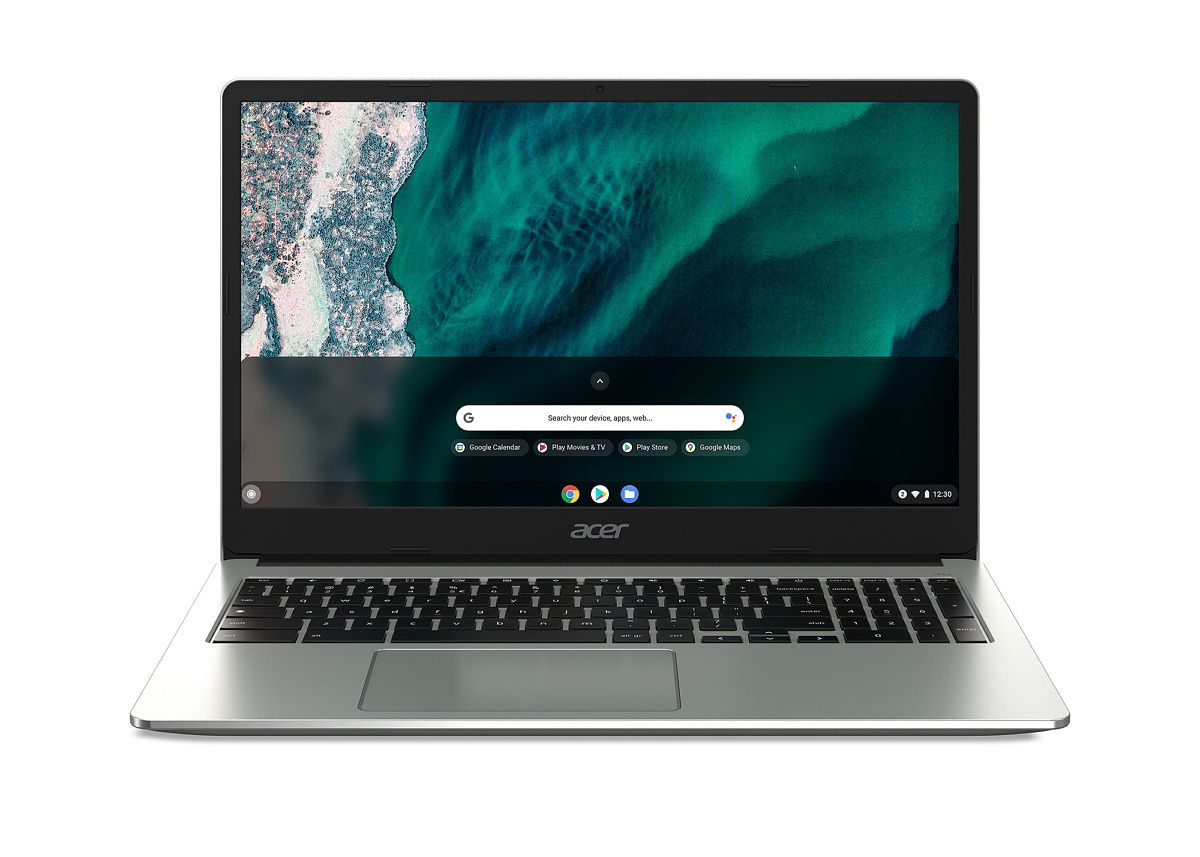
Acer’s latest Chrome OS laptops are the Acer Chromebook Spin 513, Acer Chromebook 315, and Acer Chromebook 314. The Chromebook Spin 513 is the best of the group, with a 3:2 display, up to 128GB of internal storage, a 2-in-1 convertible design, and up to 8GB RAM. It also seems to be the first laptop to use the MediaTek Kompanio 1380, which has an octa-core CPU and Arm Mali-G57 MC5 graphics, but we don’t have many details beyond that. MediaTek teased the Kompanio 1200 chipset back in November, which the company said would roughly compete with an Intel Core i3 processor.

Specification Acer Chromebook Spin 513 Acer Chromebook 315 Acer Chromebook 314
Model CP513-2H CB315-4H/CB315-4HT CB314-3H / CB314-3H T/ C934 / C934T
Dimensions & Weight
  • 300(W) x 235(D) x 16.3(H) mm
  • 1.29 kg (2.84 lb)
  • 366.35(W) x 244.2(D) x 20(H) mm
  • 1.6 kg (3.53 lbs)
  • 326.4 (W) x 225 (D) x 20 (H) m
  • 1.45 kg (3.20 lbs)
Display
  • 13.5-inch 3:2
  • 2556 x 1504
  • 15.6-inch 16:9
  • 1920 x 1080
  • Touch screen optional
  • 14-inch 16:9
  • 1920 x 1080
  • Touch screen optional
SoC/Processor MediaTek Kompanio 1380
  • Intel Celeron N4500
  • Intel Celeron N5100
  • Intel Pentium Silver N6000
  • Intel Celeron N4500
  • Intel Celeron N5100
  • Intel Pentium Silver N6000
RAM & Storage
  • 32/64/128GB storage
  • Up to 8GB RAM
  • 64/128GB storage
  • Up to 8GB RAM
  • 64/128GB storage
  • Up to 8GB RAM
Battery
“Up to 10 hours” “Up to 10 hours” “Up to 10 hours”
Audio
  • DTS Audio
  • Two microphones
  • DTS Audio
  • Two microphones
  • DTS Audio
  • Two microphones
Connectivity Wi-Fi 6 Wi-Fi 6 Wi-Fi 6
Software Chrome OS Chrome OS Chrome OS
Other Features
  • Backlit keyboard
  • MIL-STD 810H
    durability rating
  • Dedicated number pad
  • MIL-STD 810H
    durability rating
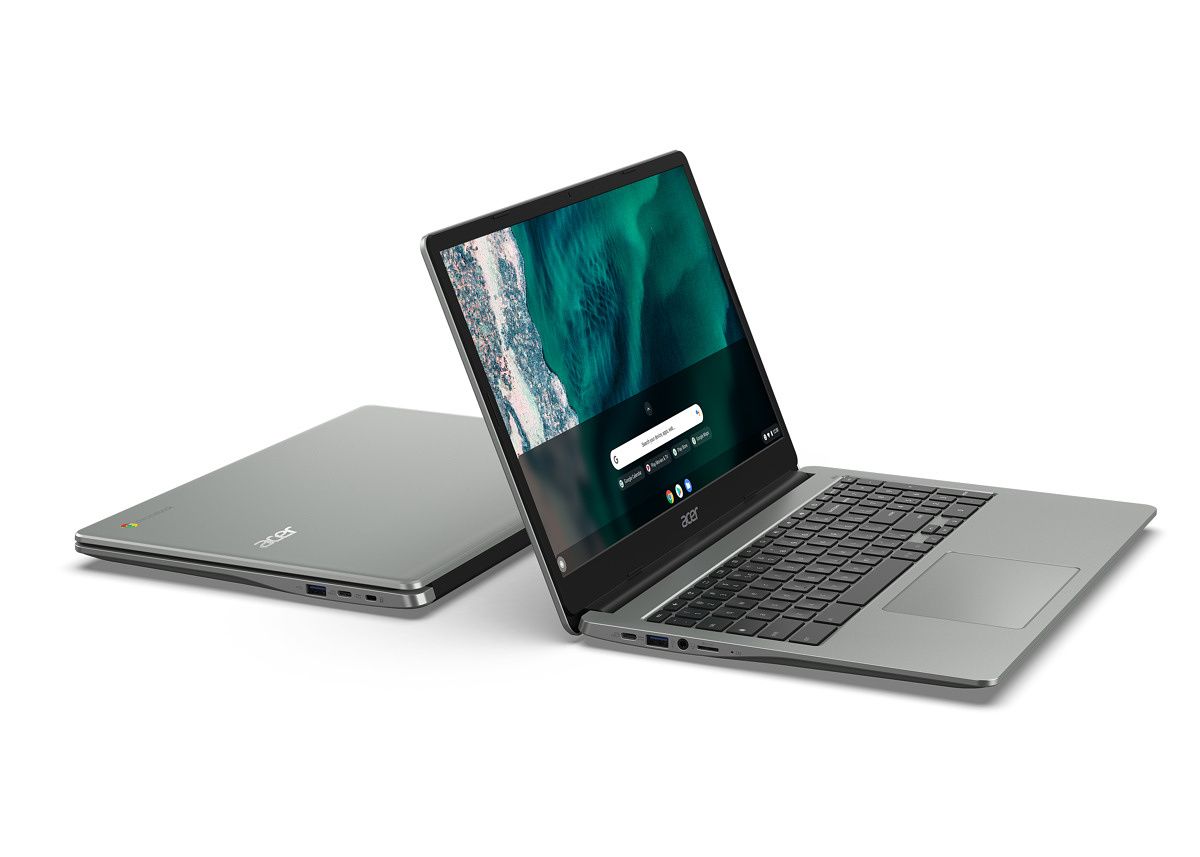
Chromebook Spin 513 CP513-2H Chromebook Spin 513 CP513-2H Chromebook Spin 513 CP513-2H

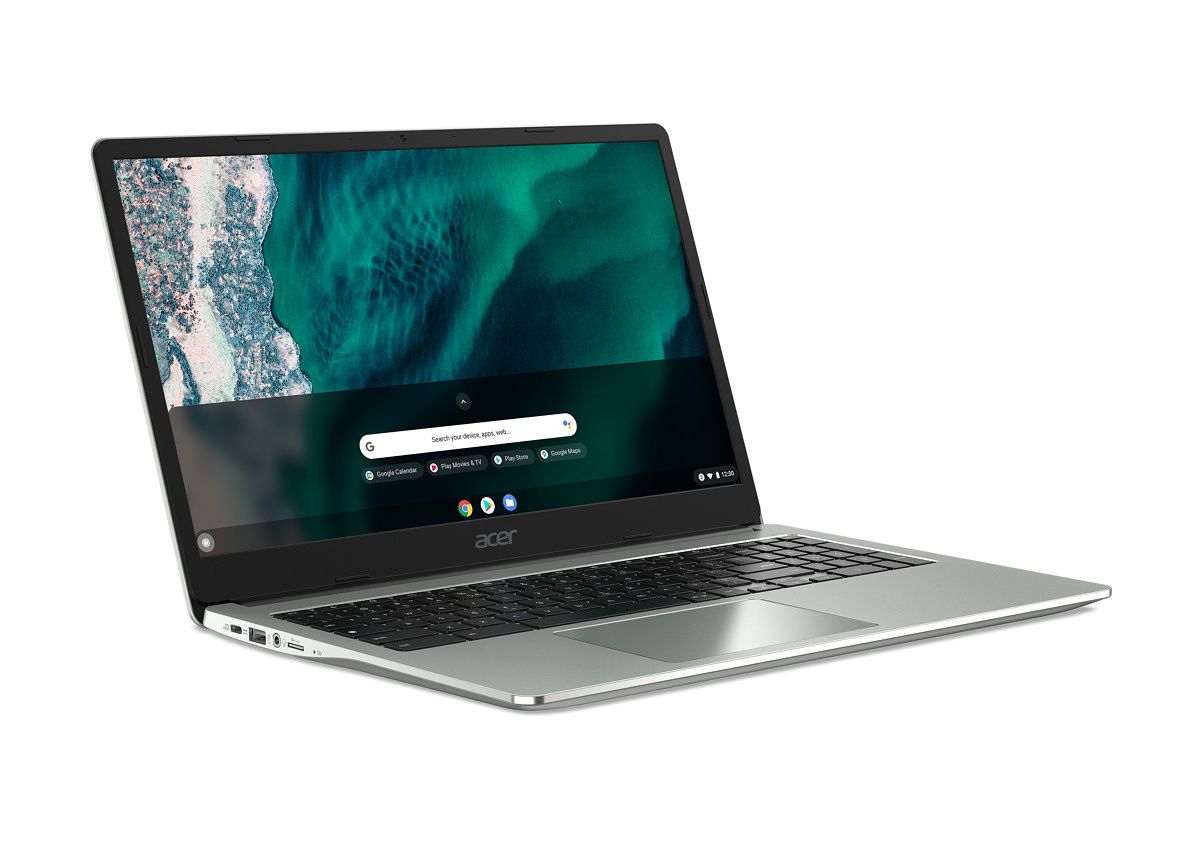
The next step down the performance ladder is the Chromebook 315, which combines lower-end processors (it can be configured down to a Celeron N4500) with a large 1080p 15.6-inch display. There’s also a dedicated number pad and two USB 3.0 Gen 2 Type-C ports. Unlike the Spin 513, this model isn’t a 2-in-1, and some models won’t even have a touchscreen.

Chromebook 315 CB315-4H(T) Chromebook 315 CB315-4H(T) Chromebook 315 CB315-4H(T)

Finally, the Chromebook Spin 314 is the cheapest of the group. Acer will sell it with the same processor options as the Spin 315, but it has a smaller 14-inch display and no dedicated number pad. Nothing too exciting there.

The Chromebook Spin 513 will be available first in EMEA in April, starting at EUR 649, with a North American release coming later in June, starting at $599.99. The cheaper Chromebook 315 will arrive in North America this month, starting at $299.99, and people in EMEA will get it in “late Q1 2022” starting at EUR 399. Finally, the Chromebook 314 will be available in EMEA in April at EUR 369, and North America in June at $299.99.

Chromebook 314 CB314-3H(T) Chromebook 314 CB314-3H(T)

The post Acer reveals three new Chromebooks, including one with MediaTek’s Kompanio 1380 appeared first on xda-developers.


from xda-developers https://ift.tt/3pNEHos
via IFTTT

AMD CEO shows off the next-gen Ryzen 6000 “Rembrandt” APU

AMD is all set to host the “AMD 2022 Product Premiere” tomorrow to showcase what’s next for the company in the computing space. As a part of the announcement, we’re expecting to see the next-gen AMD Ryzen 6000 series chips among other things. While we’re waiting for more details to be revealed, the company CEO Dr. Lisa Su decided to showcase what we believe is the next-gen 6nm APU codenamed Rembrandt. Here, take a look:

The tweet, as can you see, gives us our first look at the Ryzen 6000 series APU that’s expected to be announced tomorrow. This isn’t the first time we’ve spotted the “Rembrandt” APU, although this is our first official look straight from AMD. The Ryzen 6000 Rembrandt APU will feature up to 8 cores and 16 threads. This particular chip also supports DDR5 memory as well as the PCIe Gen4 interface. As for the iGPU, this one’s said to have six workgroup processors based on Navi graphics (RDNA2) architecture. Some Ryzen 6000 series SKUs are also said to break the 5GHz barrier, although there’s no official confirmation on that just yet.

More details about this chip are expected to arrive tomorrow during the AMD 2022 product showcase. The company CEO Lisa Lu is likely to showcase the new Ryzen 6000 series chips alongside the Radeon RX 6000M GPUs for laptops. We won’t bet our money on any other details on things like AMD AM5 or the 3D V-cache Ryzen chips, although we’re always up for some surprise announcements. We will, hopefully, have more to talk about this chip tomorrow, so be sure to stay tuned. In case you’re interested, you can watch the AMD 2022 Product Premiere here tomorrow at 7 am PT.

Intel is also expected to make a bunch of announcements regarding the rest of the Alder Lake CPUs. Intel’s 12th-gen Alder Lake lineup, in case you’re wondering, only has three CPUs right now. We’ll hopefully learn more about the Alder Lake-P mobile processors at CES 2022.

The post AMD CEO shows off the next-gen Ryzen 6000 “Rembrandt” APU appeared first on xda-developers.


from xda-developers https://ift.tt/3zpeGPI
via IFTTT

Download YouTube Vanced APK [ROOT] for your Android smartphone

YouTube Vanced is a popular modded version of YouTube. It adds a number of features to the official YouTube app, including built-in adblocking, background playback, black/dark themes, and much more. This page has installation instructions and download links for rooted devices. Non-root downloads can be found here.

Navigate this article:


Latest version of YouTube Vanced

The latest version of YouTube Vanced is 16.29.39.


How to install YouTube Vanced Root variant

Using Vanced Manager

The YouTube Vanced team has created a new, easier method for getting Vanced up and running. Users can now simply install the Vanced Manager app and it will facilitate the process of installing YouTube Vanced. Support for Vanced Music, i.e., a similarly modded version of YouTube Music has also been there since version 1.3.0. The app makes it easy to choose which theme you want and to install future updates.

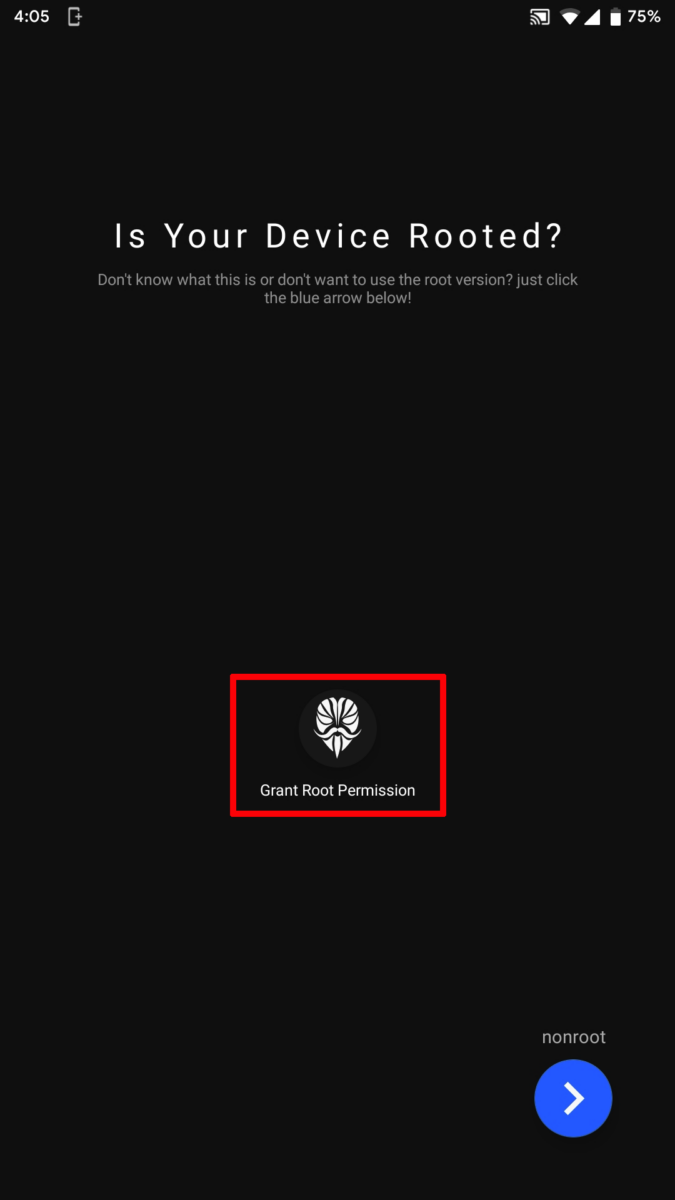
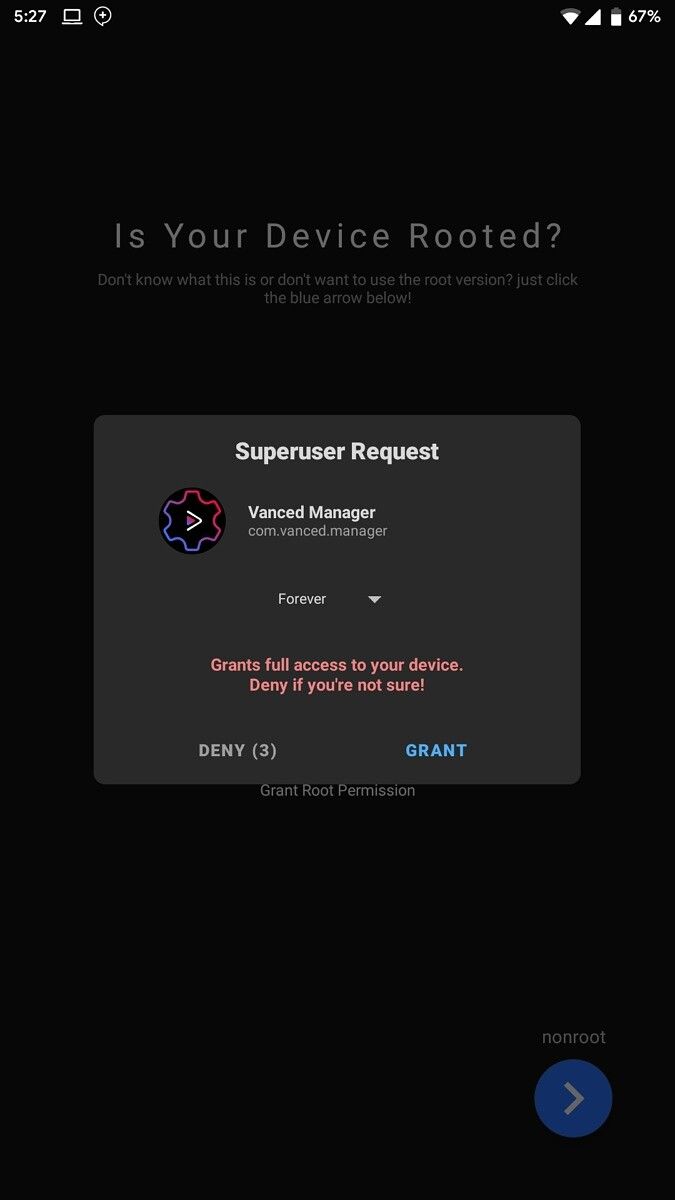
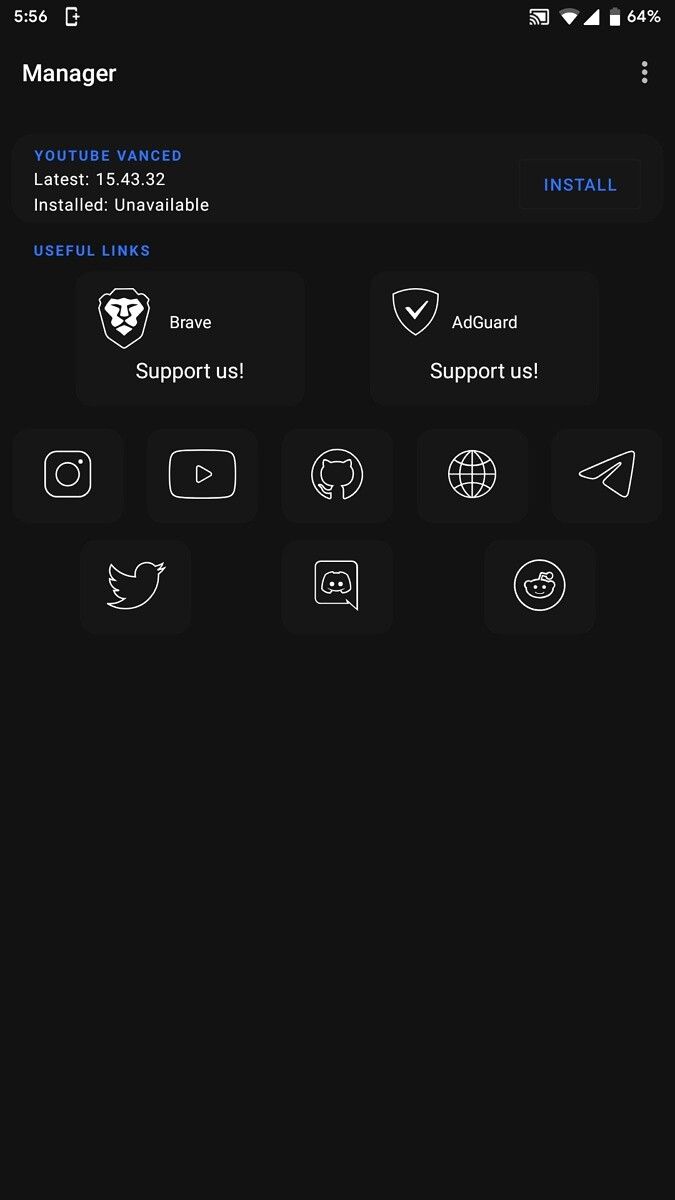
youtube-vanced-manager-root youtube-vanced-manager-root-grant youtube-vanced-manager-root-menu

Steps:

  1. Download the latest Vanced Manager from here on your Android device.
  2. Install the app and open it.
  3. Make sure to grant the app superuser access during the initial configuration wizard.
  4. Tap the “Install” icon next to Vanced and select your theme and language.
  5. YouTube Vanced will be installed as a system app. The official YouTube app will be replaced if present.
  6. Success!

Vanced Manager Downloads

Title Latest Version Codename MD5 Checksum
Vanced Manager 2.6.2 Crimson 02a2ff9e69d85de4dad105213f620382

Manual Installation

While Vanced Manager is always the recommended method for installing and managing the modded YouTube instance, power users may like to have more control over the installation process. In case you want to install this app without using Vanced Manager, you need to follow the steps mentioned below:

How To Install without Vanced Manager

  1. Find the suitable YouTube Vanced APK components for the target device and download them.
  2. Install the set of APKs using Split APKs Installer (SAI). You can download SAI from its GitHub repo, F-Droid, or Google Play Store.
    • You may need to disable signature verification in the Android framework and/or remove the existing YouTube build beforehand.

Root Versions

Note that you may not find newer versions of YouTube Vanced as separately downloadable Split APKs.

YouTube Vanced Version APK Components
15.05.54

YouTube Vanced Features

Main Features:

  • Ability to blocks all videos ads.
  • Optional AMOLED black theme to reduce eye and battery strain.
  • Allows you to play videos in the background or in Picture in Picture (only on Android 8.0 Oreo and up).

YouTube Vanced PiP

  • Swipe controls allow you to control brightness and volume like how it is in other video player apps (with configurable padding).
  • Auto-repeat feature to enjoy videos like tiktoks/vines or simply continue playing a song on loop.

Customizability:

  • Vanced allows you to override codec options (such as forcing H.264 for old devices)
  • You can also force HDR playback or turn off 60fps if you prefer a cinematic experience with custom device configs.
  • Force the default video resolution as high or low as you want and even override your screen resolution (e.g. 4K playback on any device).
  • Change the default playback speed to anywhere between 0.25x to 2x.
  • Allows you to toggle home ads, most UI ads, merchandise ads, community posts, movie upselling, compact banner info, remove comments entirely, compact movie, movie shelf removal and many more!
YouTube Vanced customization 1 YouTube Vanced customization 2

SponsorBlock

  • Full integration with SponsorBlock so that you can skip sponsor segments, i.e. a YouTuber advertises a service or product in the middle of a video.

YouTube Vanced SponsorBlock

  • Supports skipping other categories, such as intros, outros, and reminders to subscribe.
  • Complete control over whether to automatically skip a segment category or show a button for skipping, or simply just not skipping it at all.
  • Highlights the segment in the specific color based on its category in the playback timeline.
  • Possible to submit your own segments to the SponsorBlock API and contribute to the wider community.

YouTube Vanced: Frequently Asked Questions (FAQ)

If you plan on ditching the stock YouTube app in favor of Vanced, you might have some doubts about certain aspects of this mod that you want to be clarified. Listed below are several frequently asked questions about Vanced — right from the difference between the non-root and the root variants to downloading videos. If you don’t find the answer to your question here, feel free to leave it in the comments section below and if it’s relevant, we’ll answer it and add it to this section.

Which Vanced variant should I choose: Root or Non-root?

In terms of user experience, there is virtually no difference between the root and the non-root builds.

Root variant: The root variant of Vanced seamlessly replaces the official YouTube app. As a result, you can directly open YouTube links or call them using Google assistant through the modded app.

Non-root variant: However, if you have a device that is difficult to root or you don’t want to root your daily driver on the first hand, you should opt for the non-root variant. It can be installed on a rooted device as well. Since the package name of the non-root variant is different from the stock YouTube app, they can co-exist.

Note that you need to install an additional companion app (MicroG) to be able to log in with your YouTube/Google account. Moreover, you have to manually set Vanced as the default app for opening YouTube links. However, the non-root variant is simply easier to live with, so our recommendation is to stick with the non-root variant unless you really need to replace the stock YouTube app on your phone.

Are Vanced and YouTube Premium the same?

No! YouTube Premium (formerly known as YouTube Red) is a subscription-based service offered by Google that provides ad-free access to content across the service, as well as access to premium YouTube Originals, downloading videos and background playback of videos on mobile devices, and access to the YouTube Music music streaming service.

Vanced, on the other hand, is a highly modded version of the stock YouTube app which doesn’t require any kind of subscription. However, it does come with a lot of features like ad blocking, background playback, and many more that are otherwise not accessible without a YouTube Premium subscription.

Can I download videos using Vanced?

Google officially allows downloading videos from YouTube for offline viewing in these countries. Thereby, you need to purchase YouTube Premium or use a third-party app to download videos if you’re not in one of the supported countries.

Vanced itself doesn’t modify the downloader YouTube implemented. As a result, you might not get the download option for some videos, depending on your region and the restrictions imposed by the video publisher.

How do I disable battery optimization for Vanced and MicroG for Vanced?

There’s no standard method to disable battery optimization for a particular app on Android, as different OEMs implement the module in their skins in different ways. Since the steps and workflow vary from OEM to OEM, it would be better to check out our forums to find a suitable guide for your device.


YouTube Vanced is no doubt a very useful mod, and we’re glad to see the community enriching its features from time to time. It is fairly simple to use and you can have access to a multitude of exciting extra functionality to your YouTube viewing experience.

The post Download YouTube Vanced APK [ROOT] for your Android smartphone appeared first on xda-developers.


from xda-developers https://ift.tt/2SPtLsg
via IFTTT