LightBlog

mardi 1 mars 2022

Google Play system update for March 2022 updates the Play Games Services profile, fixes bugs, and more

There was no way to track features and changes in Google’s monthly Play system updates up until this year. That finally changed in January when Google set up a dedicated support page to highlight various changes included in each monthly update. Today, the company disclosed new features and improvements coming in the March 2022 update.

According to the updated support page, the Google Play system update for March 2022 will bring critical bug fixes for device connectivity, developer services, and utilities-related services. In addition, the new update brings an update to the Play Games Services profile to make it easier for users to manage their privacy settings.

There are tons of new changes for the Google Play Store, including improvements to the Play-as-you-download feature, new features for the Play Pass (which recently expanded to India) and Play Points programs, and various other enhancements and optimizations to security stability and accessibility. Finally, the March 2022 update also brings improved user experience and “feature education” for NFC/HCE devices.

The full update changelog for the Google Play system update for March 2022 is as follows:

  • Critical Fixes
    • [Auto, Phone, Tablet, TV, Wear OS] Bug fixes for device connectivity, developer services, safety & emergency, and utilities related services. [1][2]
  • Games
    • [Phone, TV] With the update to the Play Games Services profile, users will be able to better manage their privacy settings. [2]
  • Google Play Store
    • Improvements to Play-as-you-download feature to let gamers start playing mobile games while the app download continues to reduce waiting times. [3]
    • New Features to help you discover the Apps & Games you love.[3]
    • Optimizations allowing faster and more reliable download and installation.[3]
    • New features to the Play Pass and Play Points programs. [3]
    • Enhancements to Google Play Billing. [3]
    • Continuous improvements to Play Protect to keep your device safe. [3]
    • Various performance optimizations, bug fixes and improvements to security, stability and accessibility. [3]
  • Wallet
    • [Phone] Improved user experience and feature education for NFC/HCE-enabled devices. [2]
  • System Management
    • Updates to system management services that improve device connectivity, network usage, stability, security and updatability. [1][2]
  • Developer Services
    • New developer features for Google and third-party app developers to support ads, accessibility, analytics & diagnostics, machine learning & AI, and security & privacy-related developer services in their apps.

The Google Play system update for March 2022 will be rolling out to Android phones, tablets, Android TV and Google TV devices, Wear OS, and Android Auto devices in the coming days. Google notes that the updated Play Games Services profile, improvements to NFC/HCE devices, and critical bug fixes will arrive with Google Play services v22.09 while the Google Play Store improvements will go live with Google Play Store v29.5 starting March 3.


Source: Google System Updates support page

The post Google Play system update for March 2022 updates the Play Games Services profile, fixes bugs, and more appeared first on xda-developers.


from xda-developers https://ift.tt/AHERcpj
via IFTTT

These are the best Samsung Galaxy Tab S8 clear cases to buy in 2022

Samsung has finally revealed its latest lineup of tablets — the Galaxy Tab S8, the Galaxy Tab S8 Plus, and the mighty Galaxy S8 Ultra. If you’ve decided to buy the Samsung Galaxy Tab S8, an essential step would be to buy a screen protector as well. This protects the display from light scratches and ensures the tablet retains its shiny surface. Another wise idea would be to buy a case for it. Tablets are very delicate devices, and a single drop could shatter them to a million pieces. Repair costs can be very high, especially when it comes to modern, recently released devices. Why go through that when you can minimize the damages of accidents with an affordable case? You don’t even have to conceal the original design of the tablet. That’s why we have prepared for you a list of the best clear cases for the Galaxy Tab S8. Note that some of these cases were designed for the Galaxy Tab S7, but they’ll work just fine with the Galaxy Tab S8 — as both tablets share the same exterior build.

    Ringke Fusion Clear Case

    With S Pen Holder

    This clear case includes an S Pen holder so you can keep the stylus attached to your tablet at all times. Thanks to its raised lips, your tablet's display is less likely to get scratched.
    Zeking Soft Skin Case

    Affordable

    This flexible silicone case has raised edges to protect the display and costs under $10. It's ideal for those looking to protect their tablets without spending a fortune on more premium products.
    Hoidokly Hard Clear Cover

    360º Protection

    This case has a transparent back and a colored front, offering 360º protection for your tablet. It additionally supports smart display auto wake/sleep and kickstand mode.
    Cbus Wireless Flex-Gel Case

    Lifetime Warranty

    This lightweight, flexible case comes with a lifetime warranty from its manufacturer. It's comfortable, simple, and affordable.
    iCoverCase Clear Back Case

    Matte

    This transparent case has a matte layer that adds a dramatic effect. It has a non-slip design to make dropping the tablet harder.
    Araree MACH TPU Cover

    Shockproof

    This case has an S Pen holder so you don't have to worry about leaving your stylus behind. It's flexible, scratchproof, and shockproof.

If I had to buy one of these cases for my Samsung Galaxy Tab S8, I would totally go for the Zeking Soft Skin Case. It’s minimalistic, thin, barely visible, and budget-friendly. As someone who dislikes sacrificing the original look of a device in the name of protection, this case provides enough security without being in the way. It shows off the premium build and the vibrant colors of the Galaxy Tab S8, while adding an additional protective layer to the glass slab.

What’s so great about cases is that you don’t have to stick to one of them. If you find clear cases too boring, you could always switch to another, more colorful one. The process is both easy and affordable — as cases usually don’t cost much. You can have a wide variety of them that you can use based on your clothing, moods, and different occasions.

    Samsung Galaxy Tab S8
    The Samsung Galaxy Tab S8 is the entry level tablet of the company's latest flagship lineup, featuring an 11-inch screen.

Which of these clear cases are you going to buy for your Samsung Galaxy Tab S8? Let us know in the comments section below.

The post These are the best Samsung Galaxy Tab S8 clear cases to buy in 2022 appeared first on xda-developers.


from xda-developers https://ift.tt/fWjvEIl
via IFTTT

PowerToys 0.56 is out with FancyZones and mouse utility improvements

Microsoft has released a new version of its PowerToys suite of tools, bringing it to version 0.56.1. This update focuses less on brand-new features, but it does bring some notable improvements to existing ones, such as FancyZones and the mouse utilities, specifically Find My Mouse. Another noteworthy change is that new PowerToys updates now include release notes, so you don’t have to follow the GitHub releases page to know what’s new in each update.

As we mentioned above, FancyZones is getting some upgrades with PowerToys 0.56.1. Most notably, you can now create up to 128 zones using FancyZones, a massive boost from the previous maximum of 40. FancyZones is a window manager, and it lets you create custom layouts to organize all your windows. It seems unlikely that most users would ever need more than 40 zones, but if you have a massive multi-monitor setup, this might be useful for you.

Additionally, FancyZones now supports child and popup windows officially. It was already possible to assign these windows to a specific zone, but it was considered a bug, not a feature. However, Microsoft says many users asked for it to come back once it was fixed, so now it can be enabled in the FancyZones settings inside PowerToys.

Find My Mouse PowerToys settings showing the option to highlight the mouse cursor by shaking it

Meanwhile, the Find My Mouse utility, which was introduced with PowerToys 0.49, can now be triggered by shaking the mouse cursor, which makes a ton of sense. Previously, you’d have to press Ctrl twice to highlight the mouse cursor, but shaking is the natural motion most will probably do when trying to find their mouse. The default behavior remains the same, but you can enable the new option in the settings.

Another notable new feature is in PowerToys Run, the app launcher and search engine built into PowerToys. There’s a new plugin for time zone conversion, so you can quickly find out what a specific time is equal to in a different time zone.

Aside from these bigger upgrades, almost every tool in PowerToys has received some improvements and fixes. You can find the full list of changes below:

What's new in PowerToys 0.56

Always on Top

  • Fixed excess GPU / CPU usage when enabled
  • If border has focus, not closable via F4
  • Changing border sizes should resize correctly for existing windows
  • Border goes away with Outlook modal windows

ColorPicker

  • No longer crashes during theme change

FancyZones

  • Increased zone limit from 40 to 128.
  • Child and Popup window support for FancyZones. To enable, go to Settings→FancyZones→Windows. These were bugs we fixed that without realizing it was a useful feature to most.

File explorer

  • Fixes for Dev file preview: (Thanks @Aaron-Junker)
    • Fix fix for object reference not set.
    • Fix for encoding UTF-8.
    • Fix for file is in use.
    • Fix for saying the file is too big.

Image Resizer

Mouse utility

  • Find my mouse will now activate via shaking the mouse with a settings change!
  • Find my mouse now can exclude apps.
  • Fix for crosshair thickness looking odd due to anti-aliasing
  • Fix for a hard crash on crosshair (This was a hotfix for 0.55)

PowerRename

  • Will not spell check file names anymore. Thanks @niels9001
  • Autocomplete result box to not obscure apply button. Thanks @niels9001
  • Regex fix

PowerToys Run

  • Timezone conversion plugin for PowerToys Run! Thanks @TobiasSekan
  • Hexadecimal and binary numbers now are supported in the calculator plugin. This was added a bit ago and we’d like to extend a belated thanks to @gsuberland
  • Terminal plugin performance boost. Thanks @htcfreek!
  • Terminal will now be found via the Program plugin again.
  • Shutdown command is now using hybrid fast argument for shutting down
  • Support for VSCodium with VS Code workplace plugin. Thanks @makeProjectGreatAgain

Video conference mute

  • nVidia Broadcast software won’t crash anymore

Settings

  • Upgrade notes in OOBE
  • Fix for settings being lost (This was a hotfix for 0.55)
  • UX improvements. Thanks @niels9001

Installer

  • Believe we have a fix for the long hated “app.dark.png is missing” error. Thanks to @robmen for having a great blog!
  • Installer will launch PowerToys under appropriate elevation versus Admin only due to UAC prompt for installation (This was a hotfix for 0.55)
  • PowerToys will now start if installed under different user

Development

  • ARM64 – We removed the last .NET Framework dependency. Thanks @snickler for helping get this across the finish line!
  • .NET 6 upgrade, now on the newest and hottest .NET runtime
  • Code analyzers have been upgraded! Thanks @CleanCodeDeveloper!
  • Symbols are back!
  • Code refactoring, thanks @CleanCodeDeveloper and @cyberrex5 for helping here!
  • We are now on VS 2022 with the .NET 6 upgrade.

If you haven’t yet, you can download PowerToys 0.56 from GitHub, where you can easily find a history of previously released versions as well. This is also the ideal place to make contributions to the project if you want to help. You can also find it on the Microsoft Store, though it’s still installed externally from GitHub.

The post PowerToys 0.56 is out with FancyZones and mouse utility improvements appeared first on xda-developers.


from xda-developers https://ift.tt/GkUFlz1
via IFTTT

VESA launches a certification program for DisplayPort 2.0 products, introduces certified DP40 and DP80 cables

The Video Electronics Standards Association (VESA) on Monday announced a new certification program for DisplayPort products. The program will make it easier for consumers to understand whether a DisplayPort 2.0 monitor, cable, or video source they’re buying indeed supports all the bells and whistles promised by the new standard.

The latest DisplayPort 2.0 standard enables up to 16K video output along with high refresh rate support and a maximum throughput of 80Gbps. However, there’s no way to tell if a DisplayPort 2.0 cable or monitor you’re buying actually supports the higher bit rates and other features laid out in the spec. This is where the DisplayPort UHBR (Ultra-high Bit Rate) Certification Program comes into play. VESA says certified DisplayPort UHBR products are guaranteed to support the higher bit rates supported by DisplayPort version 2.0.

As part of the certification program, OEMs can send their new products to DisplayPort authorized test centers for testing and certification.

Multiple video source and display products are undergoing testing in the DisplayPort UHBR Certification Program now, and should complete early certification soon.

Certified DP40 and DP80 UHBR cables

VESA has also introduced certified DP40 and DP80 UHBR cables. Cables with DP40 certification must support up to 10Gbps link rate (USBR10) and a maximum throughput of 40Gbps over a four-lane connection. Meanwhile, DP80-certified cables must support up to 20Gbps link rate (UHBR20) and a raw bandwidth of up to 80Gbps with four lanes.

VESA DP40 and DP80 cables

“No matter how high the performance of your graphics card and monitor are, the resulting image quality can still be limited by the cable used to connect those devices. Thanks to improvements in both the DisplayPort connector and cable design, the new VESA certified DP40 and DP80 UHBR cables enable consumers to get the highest performance possible from their VESA certified devices,” said James Choate, compliance program manager, VESA.

VESA certified DP40 and DP80 cables come in both full-size and Mini Displayport configurations and are backward compatible with other DisplayPort links such as Reduced Bit Rate (RBR), High Bit Rate (HBR), and HBR3. Companies currently selling VESA certified DP40 DP80 cables include Accell, BizLink, and WIZEN.


Source: VESA

Via: ArsTechnica

The post VESA launches a certification program for DisplayPort 2.0 products, introduces certified DP40 and DP80 cables appeared first on xda-developers.


from xda-developers https://ift.tt/bLFnGEK
via IFTTT

Android 13 will let you adjust the brightness of your phone’s flashlight

Google rolled out the first developer preview build of Android 13 last month, giving us a look at some of the new features coming in the next big Android release. Along with major changes like new privacy features, themed icons, improved language controls, etc., Android 13 also includes a couple of minor improvements, like the ability to turn on the flashlight using Quick Tap gestures on Pixel devices. In addition, recent reports suggest that Android 13 will also include another flashlight-related feature that has been available on iPhones for a while.

According to Esper’s Mishaal Rahman, Android 13 introduces two new APIs to the CameraManager class — getTorchStrengthLevel and turnOnTorchWithStrengthLevel. The first returns the current brightness level of the flashlight, while the second sets the brightness level from a minimum of 1 to a maximum determined by the hardware. In essence, these new APIs will let users adjust the brightness of their phone’s flashlight, which could come in handy in various scenarios.

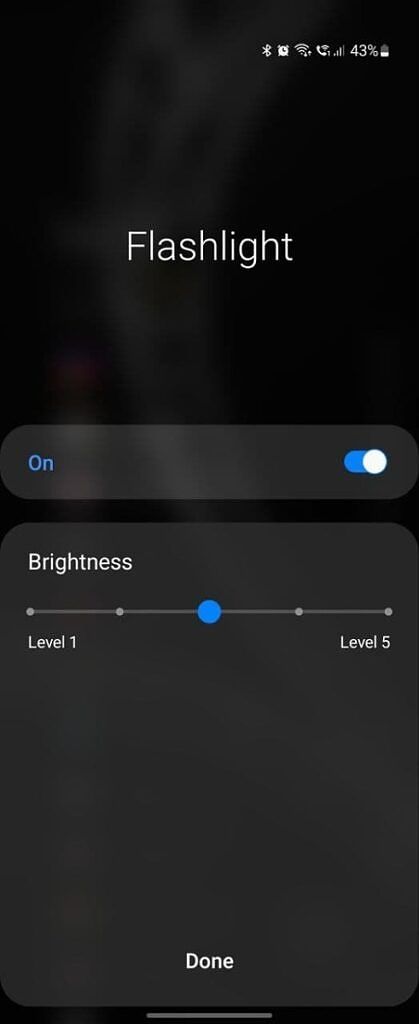
Flashlight brightness slider in Samsung's One UI 4

Flashlight brightness slider in Samsung’s One UI 4

For the unaware, Android currently only offers a toggle to turn the flashlight on or off. While the custom Android skins from some OEMs, like Samsung, include a brightness control slider for the flashlight, such a feature is not available on devices from most other OEMs. Google plans to address that with Android 13 by offering a native brightness control feature for the flashlight. However, despite the change, some devices running Android 13 might not get the feature.

As Mishaal notes, “The reason support for this feature will be limited is that it will require an update to the camera hardware abstraction layer (HAL)…[Since] Google has frozen its new HAL requirements to ensure that vendor implementations built against version N will be certifiable for up to version N+3…device makers can upgrade their devices to Android 13 while reusing a vendor implementation designed for an older Android release that doesn’t include the new camera device HAL and its support for LED brightness control.”

To offer the feature, OEMs will have to implement version 3.8 of the camera device HAL in their Android 13 release. And whether OEMs implement version 3.8 or not will depend on the requirements laid out in the vendor software requirements (VSR) for Android 13, which Google is yet to finalize.


Source: Esper

The post Android 13 will let you adjust the brightness of your phone’s flashlight appeared first on xda-developers.


from xda-developers https://ift.tt/MgeVajB
via IFTTT

MediaTek debuts Dimensity 8000 series for premium 5G smartphones

Although MediaTek’s flagship Dimensity 9000 SoC is yet to make its way into consumers’ hands, the company has already released two more chipsets for premium 5G smartphones. Built on TSMC’s 5nm production process, the all-new Dimensity 8000 and Dimensity 8100 feature octa-core CPUs and borrow several premium features from the Dimensity 9000. The new chipsets will make an appearance on upcoming smartphones from Realme and Xiaomi in the first quarter of this year, offering users flagship-level performance at a relatively affordable price.

MediaTek Dimensity 8000 series: Specifications

Specification Dimensity 8000 Dimensity 8100
CPU
  • 4x Arm Cortex-A78 @ up to 2.75GHz
  • 4x Arm Cortex-A55 @ up to 2.0GHz
  • 4x Arm Cortex-A78 @ up to 2.85GHz
  • 4x Arm Cortex-A55 @ up to 2.0GHz
GPU
  • Arm Mali-G610 MC6
  • Arm Mali-G610 MC6
Display
  • Maximum On-Device Display support: FHD+ @168Hz
  • Maximum On-Device Display support: FHD+ @ 168Hz / WQHD+ @ 120Hz
AI
  • 5th Gen APU 580
  • 5th Gen APU 580
Memory
  • LPDDR5
  • Max frequency: 6400Mbps
  • LPDDR5
  • Max frequency: 6400Mbps
ISP
  • Imagiq 780 ISP
  • Simultaneous dual-camera HDR video recording
  • Max camera sensor supported: 200MP
  • Max video capture resolution: 4K (3840 x 2160)
  • Camera features: 5Gbps 14-bit HDR-ISPs/Video HDR/Video Bokeh/Video EIS/AI-Shutter/AI-AE/AI-AF/AI-AWB/AI-NR HDR/AI-HDR/AI-FD
  • Imagiq 780 ISP
  • Simultaneous dual camera HDR video recording
  • Max camera sensor supported: 200MP
  • Max video capture resolution: 4K (3840 x 2160)
  • Camera features: 5Gbps 14-bit HDR-ISPs/Video HDR/Video Bokeh/Video EIS/AI-Shutter/AI-AE/AI-AF/AI-AWB/AI-NR HDR/AI-HDR/AI-FD
Modem
  • 3GPP Release-16 5G modem
  • 5G/4G Dual SIM Dual Standby, SA & NSA modes; SA Option2, NSA Option3 / 3a / 3x, NR TDD and FDD bands, DSS, NR DL 2CC, 200MHz bandwidth, 4×4 MIMO, 256QAM NR UL 2CC, R16 UL Enhancement, 2×2 MIMO, 256QAM VoNR / EPS fallback
  • Peak downlink: 4.7Gbps
  • 2CC Carrier Aggregation (200MHz)
  • MediaTek 5G UltraSave 2.0
  • 3GPP Release-16 5G modem
  • 5G/4G Dual SIM Dual Standby, SA & NSA modes; SA Option2, NSA Option3 / 3a / 3x, NR TDD and FDD bands, DSS, NR DL 2CC, 200MHz bandwidth, 4×4 MIMO, 256QAM NR UL 2CC, R16 UL Enhancement, 2×2 MIMO, 256QAM VoNR / EPS fallback
  • Peak downlink: 4.7Gbps
  • 2CC Carrier Aggregation (200MHz)
  • MediaTek 5G UltraSave 2.0
Connectivity
  • Bluetooth 5.3
  • Bluetooth LE Audio technology with Dual-Link True Wireless Stereo Audio
  • Wi-Fi 6E 2×2 (BW80)
  • Beidou III-B1C signal support
  • Bluetooth 5.3
  • Bluetooth LE Audio technology with Dual-Link True Wireless Stereo Audio
  • Wi-Fi 6E 2×2 (BW80)
  • Beidou III-B1C signal support
Manufacturing process
  • TSMC N5 (5nm-class) production process
  • TSMC N5 (5nm-class) production process

MediaTek Dimensity 8000

The MediaTek Dimensity 8000 features an octa-core CPU, consisting of four Arm Cortex-A78 cores clocked at up to 2.75GHz and four Arm Cortex-A55 cores clocked at up to 2.0GHz. The SoC packs an Arm Mali-G610 MC6 GPU for gaming and graphics-intensive tasks. The GPU can drive an FHD+ display at a peak refresh rate of 168Hz and includes support for 4K AV1 media decoding.

For imaging, the Dimensity 8000 makes use of the Imagiq 780 ISP, which offers support for simultaneous dual camera HDR video recording, 200MP camera support, AI-Motion unblur, AI-NR/HDR photos, and 2x lossless zoom.

MediaTek Dimensity 8000 graphic

The SoC also features MediaTek’s 5th Gen APU 580, which is 2.5x faster than the APU found on older Dimensity chipsets. It can power various AI experiences, ranging from AI camera features to multi-media and more.

In terms of connectivity, the Dimensity 8000 packs a 3GPP Release-16 5G modem that offers 5G Dual SIM Dual Standby support, peak downlink performance of 4.7Gbps, and 2CC Carrier Aggregation (200MHz). Other connectivity features include Bluetooth 5.3, Wi-Fi 6E 2×2, Bluetooth LE Audio with Dual-Link True Wireless Stereo support, and Deidou III-B1C signal support.

MediaTek Dimensity 8100

The MediaTek Dimensity 8100 is a minor step up from the Dimensity 8000. It also features an octa-core CPU featuring four Arm Cortex-A78 cores and four Arm Cortex-A55 cores. However, the Cortex-A78 performance cores on the Dimensity 8100 can boost up to 2.85GHz. The octa-core CPU is paired with the same Mali-G610 MC6 GPU. MediaTek claims that the Dimensity 8100 upgrades gaming performance with up to 20% more GPU frequency over the Dimensity 8000 and over 25% better CPU power-efficiency over previous Dimensity chips.

The Dimensity 8100 also features the same Imagiq 780 ISP, which offers simultaneous dual camera HDR video recording, 200MP camera support, 4K60 HDR10+ video capture, AI-Motion unblur, AI-NR/HDR photos, and 2X lossless zoom.

MediaTek Dimensity 8100 graphic

Like the Dimensity 8000, the Dimensity 8100 features MediaTek’s 5th Gen APU 580, but with a 25% frequency boost than the one found on the Dimensity 8000. Thanks to this, the APU offers slightly better performance in AI workloads.

As far as connectivity features are concerned, the Dimensity 8100 packs a 3GPP Release-16 5G modem with 5G Dual SIM Dual Standby support, peak downlink performance of 4.7Gbps, and 2CC Carrier Aggregation (200MHz). Other connectivity features include Bluetooth 5.3, Wi-Fi 6E 2×2, Bluetooth LE Audio with Dual-Link True Wireless Stereo support, and Deidou III-B1C signal support.

Availability

MediaTek says that smartphones featuring the new Dimensity 8000 and Dimensity 8100 chipsets will hit the market in the first quarter of this year. While the company hasn’t shared any specifics, a few OEMs have confirmed that they will soon launch smartphones featuring the new Dimensity SoCs.

Realme says its upcoming Realme GT Neo 3, which will feature its revolutionary 150W fast charging tech, will be based on the Dimensity 8100. Xiaomi’s sub-brand Redmi has also confirmed that one of its upcoming Redmi K50 series devices will pack the Dimensity 8100.

The post MediaTek debuts Dimensity 8000 series for premium 5G smartphones appeared first on xda-developers.


from xda-developers https://ift.tt/FDrTcEa
via IFTTT

OnePlus 9RT, OnePlus 8 / 8 Pro and OnePlus Nord pick up new OxygenOS updates

OnePlus has started working on the next major version of its custom skin: OxygenOS 13. While the new software isn’t coming anytime soon, the company is keeping its smartphone portfolio up to date with the latest security patches and software improvements. The company has just released new software updates for the OnePlus 9RT, OnePlus 8 series, OnePlus Nord, and OnePlus Nord CE.

OnePlus 9RT

The OnePlus 9RT is picking up a big software update, bringing tons of bug fixes, camera improvements, and system optimizations. Most notably, the new update optimizes the video quality when taking 60fps footage with the ultra-wide camera, fixes distortion and blurring issues when taking photos with the 50MP primary sensor, improves Bluetooth performance, and fixes the video call freezing issue in Instagram. The update also bumps the security patch level to February 2022.

OxygenOS 11_A4.05 update changelog:

  • System
    • [Optimized] the button color of Data saving
    • [Fixed] abnormal display of permission box when accessing File Manager for the first time
    • [Fixed] abnormal display issue when checking software update in Administrator mode
    • [Fixed] low probability issue that setting the auto screen off time not working and the screen becomes always on
    • [Fixed] the issue that Clock not responding after switching to dark mode on the World clock page
    • [Fixed] the issue that alarm is incorrectly restored in specific scenarios
    • [Improved] system stability
    • [Updated] Android Security Patch to 2022.02
  • Camera
    • [Optimized] the video quality when taking 60 fps video with ultra-wide in dark scenes
      [Fixed] the issue that may lose photos when using ultra-wide in night mode with night tripod mode on
      [Fixed] slight distortion and blurring issue of photos when taking pictures under 50 MP
      [Fixed] abnormal issue of the Flash when taking videos with Flash and Ultra steady on
      Bluetooth
      [Optimized] the stability of connecting phone to car with Bluetooth
      [Optimized] audio playback stability while connecting phone to car via Bluetooth
      Gallery
      [Optimized] response time for “sync photos” in Cloud Service
      [Fixed] the freezing issue while sharing pictures in Gallery
      Others
      [Fixed] the freezing issue when making video call on Instagram

OnePlus 8 and OnePlus 8 Pro receive February 2022 patches

The OnePlus 8T received the February 2022 patch last week, and now the OnePlus 8 and OnePlus 8 Pro are getting the same treatment. Both phones are receiving OxygenOS 11.0.11.11 with the latest Android security patches.

Changelog:

  • System
    • [Updated] Android Security Patch to 2022.02

Minor bug-fixing update for OnePlus Nord and Nord CE

Finally, the OnePlus Nord and Nord CE are getting a minor update that fixes the freezing issue when sharing photos in the default Gallery app. Both phones are still on the Jan 2022 patch level.

Changelog:

  • System
    • [Fixed] freezing issue when sharing pictures in Gallery

Download the latest OxygenOS update for the OnePlus 9RT, OnePlus 8/8 Pro, OnePlus Nord, OnePlus Nord CE

If you don’t want to wait for the OTA update, you can download the firmware package from the links provided below and flash it manually.

OnePlus 9RT

OnePlus 8

OnePlus 8 Pro

OnePlus Nord

OnePlus Nord CE

Thanks to XDA Senior Member Some_Random_Username for the download links!


Source: OnePlus forums [1], [2], [3]

The post OnePlus 9RT, OnePlus 8 / 8 Pro and OnePlus Nord pick up new OxygenOS updates appeared first on xda-developers.


from xda-developers https://ift.tt/97kcVhI
via IFTTT