LightBlog

vendredi 1 juillet 2022

OnePlus rolls out the first OxygenOS 12 Open Beta build for the OnePlus Nord CE

OnePlus today kicked off the OxygenOS 12 Open Beta program for the OnePlus 7 and OnePlus 7T series, releasing the first Android 12-based beta builds to the devices. But those aren’t the only OnePlus devices getting a taste of Android 12 ahead of the stable rollout. OnePlus has also opened the OxygenOS 12 Open Beta program for the affordable OnePlus Nord CE, and the first Android 12 beta build for the device is now rolling out to users.

In a recent post on the OnePlus Community forums, OnePlus announced the beta program for the OnePlus Nord CE and released the first Android 12 beta build to users in India. As with the update for the OnePlus 7 and OnePlus 7T series, the Android 12 beta build for the OnePlus Nord CE brings the revamped OxygenOS interface, enhanced Canvas AOD feature, a new Work Life Balance feature, and more to the phone. Here’s the full changelog for the first Android 12 beta release for the OnePlus Nord CE:

OnePlus Nord CE OxygenOS 12 Open Beta 1 changelog

  • System
    • Optimized desktop icons with improved textures, by using a design inspired by brand-new materials and uniting lights and layers
    • Optimized AI System Booster to 2.1 to support the system to run smoothly even when the load is high
  • Dark mode
    • Newly added three adjustable levels, bringing a more personalized and comfortable user experience
  • Shelf
    • Newly added style options for Cards, making data contents more visual and easier to read
    • Newly added access to OnePlus Scout in Shelf, allowing you to search multiple contents on your phone, including Apps, Settings, Media Data, etc
    • Newly added OnePlus Watch Card in Shelf, to easily glance at your health status
  • Work Life Balance
    • Newly added Work Life Balance feature, allowing you to effortlessly switch between Work and Life mode via quick settings
    • Newly supported automatic Work/Life mode switching, based on specific locations, Wi-Fi network, and time, also bringing customized App notification profiles according to the personalization
  • Gallery
    • Newly supported switching between different layouts with a two-finger pinch gesture, intelligently recognizing the best-quality pictures, and cropping the thumbnail based on the content, making the gallery layout more pleasing
  • Canvas AOD
    • Newly added diverse styles of lines and colors, for a more personalized lock screen experience with inspiring visuals
    • Newly added multiple brushes and strokes and support for color adjustment

Additionally, the build packs the Android security patches for June 2022. The update is based on OxygenOS 12.1 and its underlying build number is C.03.

If you wish to try OxygenOS 12 based on Android 12 on your OnePlus Nord CE ahead of the stable rollout, you can download the firmware by following the link below and follow the instructions provided in the announcement post to flash it on your device.

OnePlus Nord CE XDA Forums

Download: OxygenOS 12 Open Beta 1 for the OnePlus Nord CE

Before flashing the build, make sure your phone has at least 30% battery and a minimum of 4GB storage space. Also, take a full backup of your data.


Source: OnePlus Community Forums

The post OnePlus rolls out the first OxygenOS 12 Open Beta build for the OnePlus Nord CE appeared first on XDA.


from XDA https://ift.tt/ruq60vG
via IFTTT

Gboard’s new split keyboard layout is now rolling out in beta for some foldables

Google started testing a new split keyboard layout in the Gboard app with a small number of users earlier this year in May. The company is now rolling it out to more users on the beta channel, but the rollout currently seems to be limited to some Samsung foldables.

According to recent reports on Reddit, the split keyboard layout appears to be rolling out with Gboard v11.9.05.452014594 beta. However, some users claim that it isn’t available on their devices even with the latest beta release. This leads us to believe that Google is still A/B testing the feature and it might be a while before it rolls out widely.

Screenshot of Gboard split keyboard layout on Samsung foldable.

Credit: u/InspektrGdgt

You can check if the split keyboard layout is available on your device by selecting the keyboard layout button in the toolbar. If you’re among the lucky few who have received the feature, it should show up on the layout selection screen. If it doesn’t, you might have to wait a while to get it on your phone. At the moment, the layout hasn’t made its way to Android tablets. But we expect Google to roll it out to tablets in the coming weeks. We’ll make sure to let you know when it starts rolling out widely.

Along with the split keyboard layout, Gboard also seems to be getting contextual Emoji Kitchen suggestions in the predictive text bar on the stable channel. According to 9to5Google, the suggestions appear when you type a message with the “Emoji stickers” feature enabled.

Have you received Gboard’s split keyboard layout on your device? What do you like or don’t like about the new layout? Let us know in the comments section below. Also, share your thoughts on the new contextual Emoji Kitchen suggestions. How accurate have the contextual suggestions been in your experience?


Source: Reddit, 9to5Google

The post Gboard’s new split keyboard layout is now rolling out in beta for some foldables appeared first on XDA.


from XDA https://ift.tt/27CyYPN
via IFTTT

These are the Best Cases for your Amazon Kindle 10th Gen

Amazon has a bunch of Kindles to offer as e-readers, but the entry-level Kindle remains a great way to get into the world of e-book readers. The base model has all the essentials, including a large e-ink display, plenty of storage to store your ebooks, and a built-in front light to ensure your reading won’t be interrupted when there’s no external light source.

Kindle e-readers have an incredibly long life span, and they can easily last for several years with good care. If you just picked up the all-new Kindle 10th Gen, investing in a protective case would be a good idea. While protection is the one reason to get a case, it’s also a great opportunity to add some style to your Kindle. The Kindle only comes in the same boring Black and White colors, and its design isn’t exactly what you would describe as eye-catching or aesthetically pleasing.

There are a wide range of protective cases available for the Kindle 10th Gen. To help you save time and effort, we have rounded up the best options below. Note that all cases mentioned here are only compatible with the Kindle 10th Gen model that came out in 2019.

    Ayotu

    Slim yet protective

    Made out of durable synthetic leather, this case protects your Kindle without adding too much bulk. It has a magnetic lock to keep the case securely closed and auto lock and sleep feature. It comes in a wide variety of colors and patterns.
    Kindle Fabric cover

    Official cover

    The official Kindle cover features premium fabric with microfiber interior to protect the display against scratches. It also has a discreet Kindle logo in the bottom left corner and can automatically wake your Kindle and put it to sleep when you open and close the lid. Comes in Charcoal Black, Cobalt Blue, Punch Red, Sandstone White
    CoBak

    Waterproof leather exterior

    This case from CoBak has waterproof PU leather exterior and anti-scratch microfiber interior. Just like other cases, it also offers smart wake and sleep feature and comes in a wide selection of colors, designs and finishes.
    Miroddi stand case

    Comes with a foldable stand

    This is one of the more versatile cases for the Kindle. It’s made out of durable PC hardback and soft PU leather sleeve and has a slim fit design. And it comes with a buit-in foldable stand for hands-free reading, an integrated elastic hand strap for a secure grip, and a card slot to store your cards.
    Kindle Printed Cover

    Official printed cover

    This official printed cover from Amazon comes in three high-quality designs: Bookscape, Library, and Mystery. The case is lightweight and has magnetic closure and auto sleep and wake function.
    Fintie Folio case

    Retro look

    This retro case from Fintie is made out of synthetic leather and has open interior pocket that lets you easily slot in your kindle. It’s a bit heavier than other cases but that also means it will provide more protection against drops and falls.

There you have it. The best cases for your Kindle e-reader. Investing in a folio case is the best way to protect your Kindle against scratches and accidental damage. If you want something within your budget, the Aytotu is the best option. It provides good protection against scratches and drops without adding too much weight. You can also consider the Miroddi Stand case, which comes with a built-in kick-stand, hand strap, and a card slot.

    Amazon Kindle 10th Gen
    The all-new Kindle 10th Gen packs a 6-inch E-ink display with front light and up to four weeks of battery.

Own a different Kindle e-book reader? Check out the best cases for the Paperwhite 10th Gen and Paperwhite 11th Gen. And, you can find the best cases for the Kindle Oasis here.

The post These are the Best Cases for your Amazon Kindle 10th Gen appeared first on XDA.


from XDA https://ift.tt/L1Y9Ppi
via IFTTT

Nvidia Shield Experience 9.1 brings Auto Low Latency Mode, Night Listening Mode, and more!

Nvidia is rolling out a fresh software update for all Shield TV devices. The latest release is based on Shield Experience 9.0, and it introduces a host of new features and bug fixes, including a new Auto Low Latency Mode, a Night Listening Mode, AI upscaling support for 60Hz HDR10 video, and more.

Nvidia Shield Experience 9.1 started rolling out to all Shield and Shield Pro devices earlier this week, and it includes the following changes:

  • Enhancements:
    • Adds support to automatically enable game mode on supported TVs (ALLM)
    • Adds night listening mode (HDMI audio only)
    • Adds option specify network workgroup when connecting to SHIELD over local network
    • Adds option to create your own password when connecting to SHIELD over local network
    • [SHIELD Pro 2019] Adds AI upscaling support for 60Hz HDR10 video
    • [SHIELD Remote 2019] Adds option to only wake SHIELD with power button or NETFLIX button
    • [Game Controllers] Adds option to only wake SHIELD with logo button
    • Adds option to match uncompressed audio with Dolby reference volume levels
    • Adds option to disable displaying HDR/Dolby Vision content
    • Adds notification when app uses microphone
  • Bug fixes:
    • Display
      • Fixes bug where Dolby Vision mode would become re-enabled after reboot
    • Network
      • Resolves issue where link speed was not reported when connecting ethernet cable
      • Resolves issue where “Restart Wi-fi” in Quick Settings was not working properly
    • Audio
      • Resolve audio pops heard after hotplug of USB audio devices
      • Fixes bug where some apps would only play through headphones after “Match content audio resolution” is enabled
      • Resolves issue where HDMI fixed volume required disable-enable cycle to work properly
      • Fixes bug where stereo upmix would not become enabled after playing multichannel discrete audio
      • [SHIELD 2019] Disables comfort noise feature when Dolby Audio Processing is enabled
    • Storage
      • Improves file transfer speeds to attached storage
      • Resolves issues where NAS would not reconnect after SHIELD restart
    • Accessories
      • Fixes bug where SHIELD Controller 2017 or SHIELD Remote 2015 would not auto pair after taking upgrade
    • Shield TV app
      • Fixes bug where SHIELD TV app would not send keyboard entries while streaming GeForce NOW
      • Resolves SHIELD TV app issue where user could not copy/paste text (passwords, URL, etc)
    • Other
      • Resolves issue connecting to GeForce NOW servers while NVIDIA Share is active
      • Improves stream to twitch duration indefinitely
      • Resolves issue where system would become unresponsive after enabling Dolby Audio Processing from quick menu
      • Resolves issue where SHIELD would wake up unexpectedly
      • Improved HDMI-CEC compatibility with other HDMI connected devices
      • Resolves issue where app switcher (double tap home) would not show most recent screenshot properly
      • Resolves adb connection issue where host PC would need to be re-authorized after 7 days
      • Fixes bug where D-pad “up” and “down” would not function after upgrade

While some users report that the latest Shield Experience update fixes several annoying issues, others say that it completely bricks their devices. Therefore, we advise users to head over to Nvidia’s announcement thread (linked below) and check user reports for their respective devices before installing the update.


Source: Nvidia forums

The post Nvidia Shield Experience 9.1 brings Auto Low Latency Mode, Night Listening Mode, and more! appeared first on XDA.


from XDA https://ift.tt/S9HMZ1s
via IFTTT

The OnePlus Nord 2T will go on sale in India starting July 5

After launching the OnePlus Nord 2T in Europe earlier this year in May, OnePlus has now launched the device in India. The latest addition to OnePlus’ affordable Nord lineup packs MediaTek’s Dimensity 1300 chip, a 50MP triple camera setup, a 4,500mAh battery, and 80W wired fast charging support. If you’re in the market for a new mid-range smartphone, here’s everything you need to know about the OnePlus Nord 2T.

OnePlus Nord 2T Review: Nailing the fundamentals, the same as it did before

OnePlus Nord 2T: Specifications

Specification OnePlus Nord 2T
Dimensions & Weight
  • 159.1 x 73.2 x 8.2mm
  • 190g
Display
  • 6.43-inch FHD+ AMOLED
  • 90Hz refresh rate
  • HDR10+ certified
  • Gorilla Glass 5
SoC MediaTek Dimensity 1300
RAM & Storage
  • 8GB/12GB LPDDR4X RAM
  • 128GB/256GB UFS 3.1 storage
Battery & Charging
  • 4,500mAh
  • 80W wired fast charging support
Security In-display fingerprint sensor
Rear Camera(s)
  • Primary: 50MP IMX766, OIS
  • Ultra-wide: 8MP, 120° FoV
  • Mono: 2MP
Front Camera(s) 32MP IMX615, EIS
Port(s) USB Type-C
Audio Dual stereo speakers
Connectivity
  • 5G
  • 4G LTE
  • Wi-Fi 6
  • Bluetooth 5.2
  • NFC
Software OxygenOS 12.1 based on Android 12
Colors
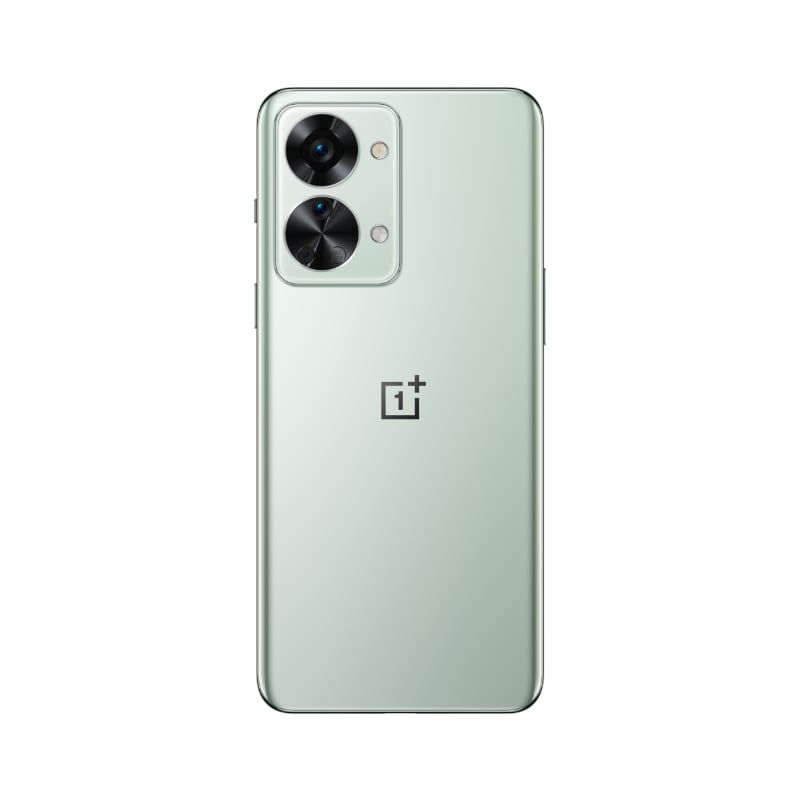
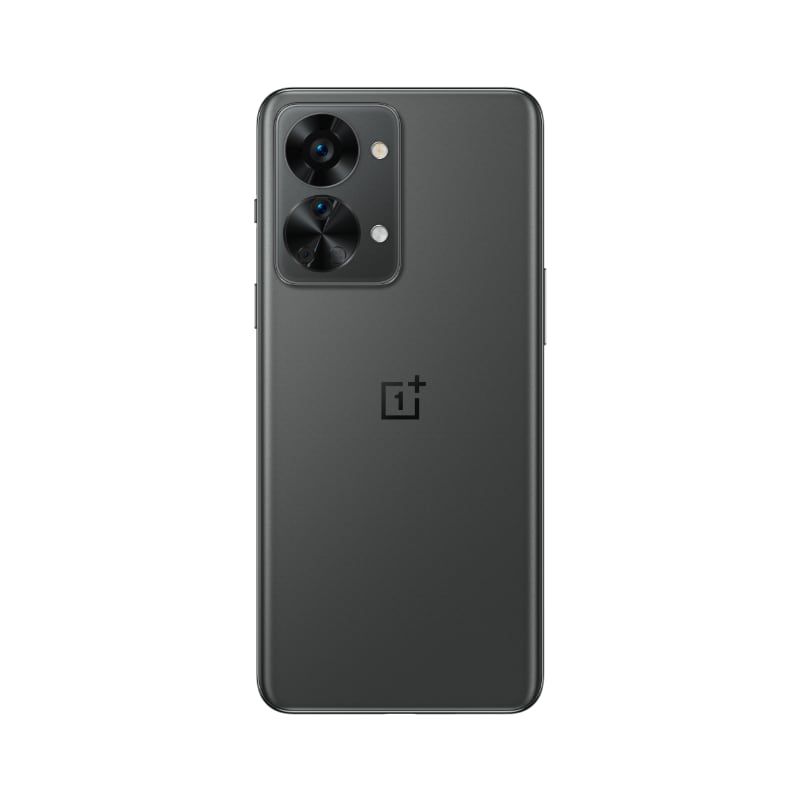
  • Gray Shadow
  • Jade Fog

In case you missed our previous coverage, the OnePlus Nord 2T is a minor upgrade over the Nord 2 from last year. The device features an updated design with a rectangular camera island on the back, which houses three camera sensors. These include a 50MP Sony IMX766 primary camera with OIS, an 8MP ultra-wide camera, and a 2MP macro sensor. Over on the front, the device has a 6.43-inch FHD+ 90Hz AMOLED display with a left-aligned hole-punch cutout for the 32MP selfie shooter.

The Dimensity 1300 on the OnePlus Nord 2T is paired with up to 12GB LPDDR4X RAM, up to 256GB UFS 3.1 storage, and a 4,500mAh battery with 80W wired fast charging support. Other noteworthy features include HDR10+ certification, an in-display fingerprint sensor, and a USB Type-C port.

Green OnePlus Nord 2T on white background. Gray OnePlus Nord 2T on white background.

The OnePlus Nord 2T runs OxygenOS 12.1 based on Android 12 out of the box and OnePlus is promising two major Android upgrades and three years of security updates for the device.

Pricing & Availability

The OnePlus Nord 2T will be available in two color variants, Gray Shadow and Jade Fog, starting July 5. The device will be available through OnePlus’s website, Amazon.in, the OnePlus Store app, OnePlus Experience stores, and other major offline retailers in the region. The base 8GB+128GB variant of the device will set you back ₹28,999 (~$367), while the premium 12GB+256GB model will cost ₹33,999 (~$430). Those who purchase the device before July 11 using an ICICI bank credit or debit card will receive an instant bank discount of ₹1,500.

    OnePlus Nord 2T
    The OnePlus Nord 2T features MediaTek's Dimensity 1300 chipset and a 4,500mAh battery with 80W fast charging support.

Along with the OnePlus Nord 2T, OnePlus has also launched a new Blue Agate color variant of the OnePlus Nord Buds and the OnePlus Bullets Wireless Z2 in India.

Thinking of buying the OnePlus Nord 2T? Check out our review of the device (linked above) before making your purchase.

The post The OnePlus Nord 2T will go on sale in India starting July 5 appeared first on XDA.


from XDA https://ift.tt/dt4o5Tx
via IFTTT

OneDrive’s Photo Story feature is now available in public preview

In February this year, we spotted evidence pointing towards a new Photo Story feature in a teardown of Microsoft OneDrive v6.49 Beta 1 for Android. Initially, the strings only revealed the feature’s name. However, a subsequent beta release (v6.50 Beta 3) included more strings highlighting its functionality. Microsoft has now officially announced the feature, and here’s everything you need to know about it.

In a recent post on the OneDrive blog, Microsoft reveals that Photo Story in OneDrive is “a new, interactive feature that securely connects your favorite memories to the people who matter the most.” Essentially, the feature lets OneDrive users create a private, invitation-only feed where they can share images with family and friends. It offers support for comments, reactions, and notifications.

Currently, the feature is available in beta in Australia on the OneDrive mobile app for Android and iOS, along with OneDrive for web. Microsoft plans to roll it out to users in the U.S. and other regions later this year. If you wish to try it out, you can download the OneDrive mobile app on your smartphone and sign up for a personal OneDrive account. Once you’re in, you can select the Shared tab to create your first photo story. You can then invite friends and family to view your photo story feed, and they will be able to leave comments and reactions on the images you share.

The Photo Story feature is available for OneDrive Basic 5GB (free), OneDrive Standalone 100GB, Microsoft 365 Personal, and Microsoft 365 family accounts. It is not available for OneDrive work or school accounts.

What do you think of OneDrive’s new Photo Story feature? Do you think it’s a handy addition, or would you much rather have Microsoft focus on other, more useful features for its cloud storage service? Let us know in the comments section below.

The post OneDrive’s Photo Story feature is now available in public preview appeared first on XDA.


from XDA https://ift.tt/veAPGNq
via IFTTT

OxygenOS 12 Open Beta 1 brings Android 12 to OnePlus 7 and 7T series

We’re quickly approaching Android 13‘s official launch, but some phones are still in line for last year’s software. OnePlus, for example, has focused on updating its more recent devices to Android 12, but it’s finally turned its attention to its 2019 flagships. After a brief closed beta testing period, the company has finally announced the release of the first Open Beta build of OxygenOS 12 for the OnePlus 7 and 7T lineup.

As you might expect, this is a beefy update for OnePlus 7/7 Pro and 7T/7T Pro owners. Not only does OxygenOS 12 sport an all-new look, but the first public beta brings along an enhanced Canvas AOD feature, three adjustable levels in the dark mode, an inbox frame rate stabilizer, and much more. Along with those OnePlus-specific tweaks, this software includes all of Android 12’s various enhancements under the hood.

You can check out the complete list of changes below:

  • System
    • Newly added Smart Battery Engine, a feature that prolongs your battery life based on smart algorithms and biomimetic self-restoration technology
    • Redesigns app icons using new materials to give more depth and a greater sense of space and texture to the icons
    • Revamps the page layout based on the principle of reducing visual noise and optimizes the presentation of text and color to make key information stand out
    • Optimized desktop icons with improved textures, by using a design inspired by brand-new materials and uniting lights and layers
    • Optimized spam block rules: Adds a rule for blocking MMS messages
  • Games
    • Newly added the HyperBoost end-to-end frame rate stabilizer
    • Newly added Voice effect preview to allow you to record your voice effect or check your voice effect in real time
  • Dark mode
    • Dark mode now supports three adjustable levels, bringing a more personalized and comfortable user experience
  • Shelf
    • New additional style options for Cards, making data contents more visual and easier to read
    • Newly added access to OnePlus Scout in Shelf, allowing you to search multiple contents on your phone, including Apps, Settings, Media Data, etc
  • Work Life Balance
    • Work Life Balance feature is now available to all users, allowing you to effortlessly switch between Work and Life mode via quick settings
    • WLB 2.0 now supports automatic Work/Life mode switching, based on specific locations, Wi-Fi network, and time, also bringing customized App notification profiles according to the personalization
  • Gallery
    • Gallery now allows you to switch between different layouts with a two-finger pinch gesture, intelligently recognizing the best-quality pictures, and cropping the thumbnail based on the content, making the gallery layout more pleasing
  • Canvas AOD
    • Canvas AOD brings you new diverse styles of lines and colors, for a more personalized lock screen experience with inspiring visuals
    • Newly added multiple brushes and strokes and support for color adjustment
    • Optimized software algorithm and improved face recognition to better identify the features and skin color of different figures
  • Accessibility
    • Optimized categorization of functions by grouping them into vision, hearing, interactive actions, and general
    • TalkBack supports more system apps including Photos, Phone, Mail, and Calendar

Additionally, the release ships with the June 2022 Android security patches. The underlying build number is H.20 for the OnePlus 7 series, while the OnePlus 7T family gets F.12 as their initial Open Beta. The OxygenOS base is 12.1 for both.

According to OnePlus, this is an early build, released in order to gather feedback before rolling out to the stable channel. As such, expect the beta software to be less stable than normal builds, and so you probably shouldn’t install it on your daily driver. Nonetheless, make sure you backup your stuff before you proceed.

XDA Forums: OnePlus 7 || OnePlus 7 Pro || OnePlus 7T || OnePlus 7T Pro


Download: OxygenOS 12 Open Beta 1 based on Android 12 for the OnePlus 7 and 7T series

For the OnePlus 7 and 7T family of devices, the first OxygenOS 12 Open Beta release is available only for the Indian variants. The installation package for each phone is nearly 4GB in size, so keep that in mind if you’re on a limited data plan. OnePlus also recommends you have at least 30% battery available on your device before attempting the flash.

Although your personal data shouldn’t be affected on upgrading to the Open Beta build, reverting to the stable channel will lead to a wipe, so always take a complete backup beforehand.

OnePlus 7

OnePlus 7 Pro

OnePlus 7T

OnePlus 7T Pro


Source: OnePlus Community Forums (12)

The post OxygenOS 12 Open Beta 1 brings Android 12 to OnePlus 7 and 7T series appeared first on XDA.


from XDA https://ift.tt/W2ZejcU
via IFTTT