LightBlog

mercredi 31 août 2022

Logitech’s cloud gaming handheld could pack the Snapdragon 720G and a 6,000mAh battery

Logitech is working in partnership with Tencent to bring a new cloud gaming handheld to the market later this year. While the company is yet to release any details about the device, a recent leak gave us our first look at its design. Now, we have a few details about its hardware.

A Google Play Console listing of the Logitech cloud gaming handheld reveals that the device will have the model number GR0006 and will pack the Qualcomm SM7125 SoC (AKA the Snapdragon 720G), the Adreno 618 GPU, and 4GB of RAM. The listing also reveals that the device will run Android 11 out of the box, and it includes a render that confirms the design we saw in the recent leak.

Logitech G Cloud Gaming Handheld Google Play Console listing screenshot.

Via: Kuba Wojciechowski

An FCC listing of a Logitech device with the same model number further adds that it will pack a 6,000mAh battery and Wi-Fi 5 support. While there are no mentions of a cellular variant in the FCC listing, it does reveal that the device will likely be called Logitech G Cloud Gaming Handheld. A USPTO listing of the device also confirms this moniker.

Based on these specs, we suspect that the Logitech G Cloud Gaming Handheld might just be an affordable console exclusively for cloud gaming services. It might not be great for mobile games, however, due to the older Snapdragon 720G chip, Adreno 618 GPU, and 4GB of RAM. If that’s the case, the Logitech G Cloud Gaming Handheld might prove to be a tough sell compared to a mid-range smartphone with a gaming controller.

Would you pick a dedicated cloud gaming device over a similarly-priced mid-range Android smartphone and gaming controller combo? Let us know in the comments section below.

The post Logitech’s cloud gaming handheld could pack the Snapdragon 720G and a 6,000mAh battery appeared first on XDA.


from XDA https://ift.tt/ra387wB
via IFTTT

Steam Deck hits a milestone with 5,000 verified and playable titles

Steam Deck launched unlike any other console in recent memory; with a huge library of games. Being a handheld PC with the backing of the Steam library meant no waiting for releases. It’s truly a unique product right now, with Valve doing enormous work to get as many of its games as possible running on its Linux-powered SteamOS.

Part of that is the Deck Verified badge that titles can acquire if they meet Valve’s standards. There’s cause for celebration, too, as a huge milestone was just hit with 5,000 games now verified or playable on Steam Deck.

5,000 is a monumental achievement in itself, but considering the timeline makes it even more remarkable. Back in early February, there were around 130 verified titles as the first batch of Decks were close to shipping. And Valve is checking all of these games manually to make sure they meet the standards.

What Steam Deck verification means

Steam Deck unboxing

Getting the coveted badge means a game works the best on Steam Deck, meeting a series of requirements.

  • Full controller support with appropriate on-screen buttons and automatic on-screen keyboard pop-up when required.
  • No compatibility warnings and any launchers should be useable with a controller.
  • Support default resolution (1280 x 800 or 1280 x 720) with legible text and “good” default settings.
  • Full system support – either native build for Linux or full compatibility with Proton, including anti-cheat.

Valve’s intention is to check the entire Steam library, no small task. There are some games that just flat out don’t work, looking at you Destiny 2. There are also plenty that surprisingly work really well. Apex Legends, including its anti-cheat, is verified, as is Marvel’s Spider-Man Remastered, a personal favorite. Other big hitters include Death Stranding, God of War, and Horizon: Zero Dawn.

Verified is the top tier, but below this, the Playable badge means that the game runs well, but may require some user tweaking. Verified games run straight out of the box with no input required. This might mean something such as settings changes, using a custom controller configuration or that there’s a launcher that doesn’t play ball.

These 5,000 aren’t the only playable games, though. There are plenty in the library that do work well on Linux and Steam Deck that Valve just hasn’t got to yet. If you have a Steam Deck or you’re waiting on one, bookmark ProtonDB. It’s a community tool where users provide feedback on how well games work and what you might need to do on your Steam Deck to make them better.

Valve has also been getting along better than expected with building the Steam Deck, moving a number of Q4 orders up into Q3. It’s crazy to think they’re still fulfilling pre-orders all these months on. But those joining later are getting a more mature platform that’s easier to use and packed with verified games.

    Steam Deck
    Valve's first portable gaming PC, the Steam Deck is one of the hottest devices of 2022 with a huge library of games to play on it

The post Steam Deck hits a milestone with 5,000 verified and playable titles appeared first on XDA.


from XDA https://ift.tt/9Fx32mO
via IFTTT

How to factory reset an Apple HomePod or HomePod Mini

Almost all of the time, Apple’s HomePod and HomePod Mini are simple to use and just get on with their job without fuss. But occasionally things go wrong. In those instances, you have options, like rebooting the HomePod. But in others, you’ll need to pull out the big guns and go for a full factory reset. You also need to do this before disposing off or selling your HomePod speaker.

Setting up the HomePod is such an incredibly simple process you’re probably hoping the same is true of resetting. That isn’t totally untrue, but as the settings and controls are designed to get out of the way, it’s not immediately obvious how to do it.

Never fear. Let’s dive in and explain it all.

What to try first if your HomePod is misbehaving

Apple HomePod settings

Resetting your HomePod should be the last resort if it’s misbehaving. There was a time also you would need to do this just to change to a new Wi-Fi network, but thankfully that isn’t the case anymore. But before resetting you should try simply restarting your HomePod to see if it fixes the problem.

You can do this in the Home app either on a Mac or on an iOS device.

  1. Open the Home app.
  2. On iOS, touch and hold on your HomePod. On Mac, right-click on it.
  3. On iOS, scroll to the bottom and tap the settings cog. On Mac, select Settings from the right-click menu.
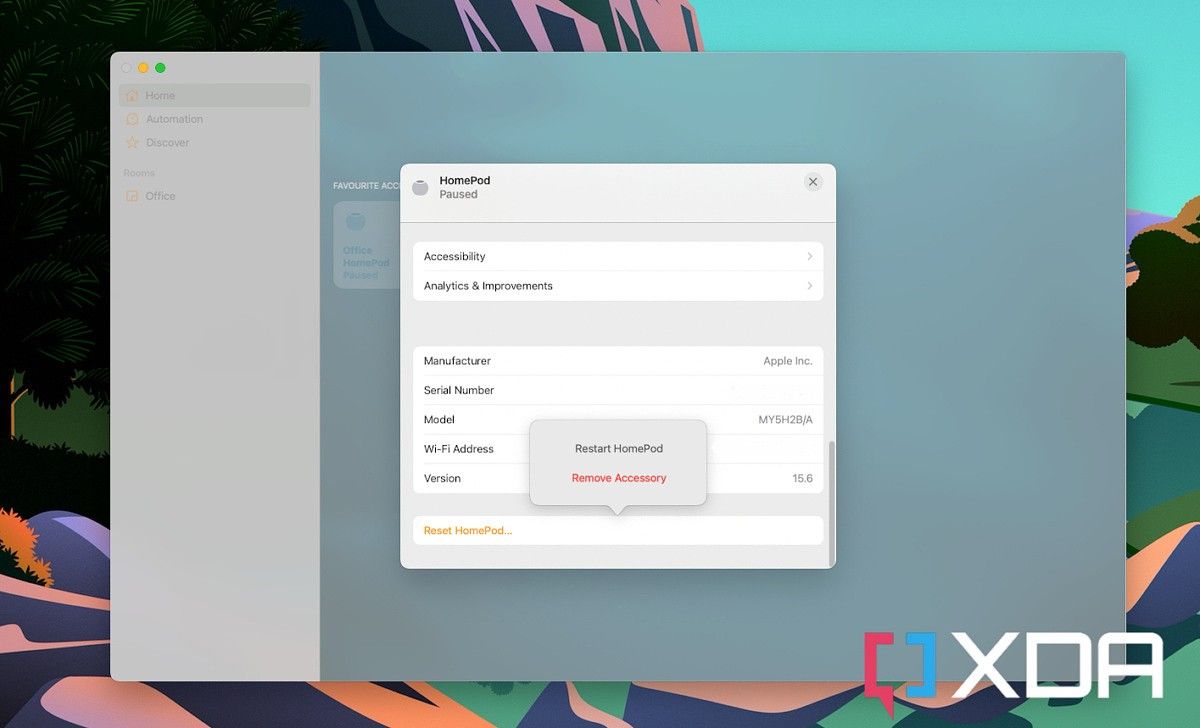
  4. Select Reset HomePod.
  5. Select Restart HomePod.

Your HomePod will now reboot itself and when it comes back to life hopefully rectified your issues. If it didn’t or you’re getting rid of your HomePod, then you’ll be looking at a full factory reset.

How to perform a factory reset on a HomePod

HomePod Mini

The process of doing a factory reset in the Home app is a little misleading. It involves following the steps from the previous section up to step four. But when you tap Reset HomePod you don’t actually have an option in the next menu that just says reset.

Instead, you have to remove the HomePod from your Home entirely. This triggers the factory reset. So, instead of choosing the restart option as above, select Remove Accessory instead. You can now set it up again as a new device and hopefully, your issues have been resolved.

Alternative methods to reset a HomePod

Restoring a HomePod with a Mac

There are a couple of alternative methods to reset a HomePod that don’t involve the Home app. You shouldn’t need to use these, but if the app method isn’t working it’s handy to have something to fall back on.

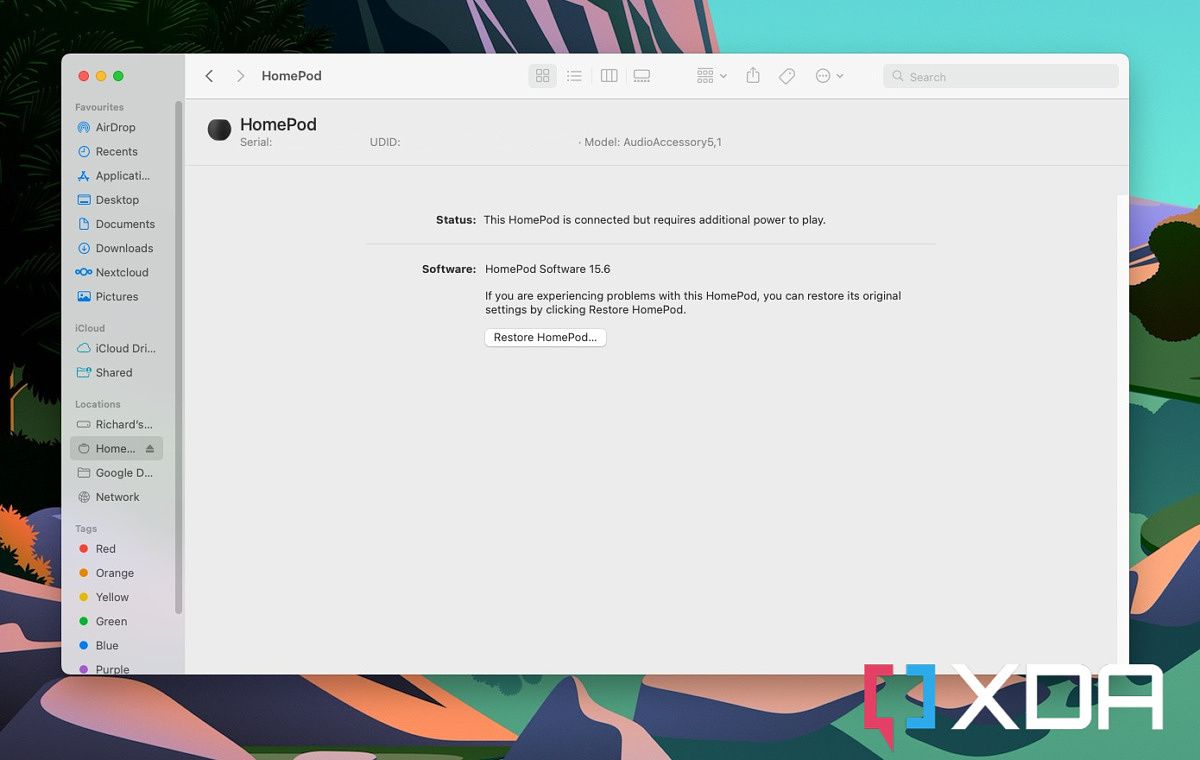
The first thing you can do is hook up your HomePod to your Mac or PC directly using its integrated cable. On the Mac, you’ll see the device show up inside Finder, but on Windows, you’ll need to have the latest version of iTunes installed.

iTunes (Free+, Microsoft Store) →

Whichever you’re using when your HomePod appears, click on it, then click the box that says Restore HomePod. Your Mac or PC will now go through the restore process to put your HomePod back to factory settings. Once the light on the top is no longer orange, the process is complete.

Alternatively, you can try the hardware method.

  1. Unplug your HomePod and wait for about 10 seconds.
  2. Plug it back in and wait for the same time.
  3. Touch and hold on top of the HomePod.
  4. Wait for the light to turn red and keep holding.
  5. When you hear a message from Siri about resetting followed by three beeps, release your finger.

As before this will restore the HomePod to factory settings and you can now set it up again using your Mac or iOS device.

    Apple HomePod Mini
    Apple's HomePod Mini is small in size but big in sound and is a great partner to the Mac, iPhone and iPad.

The post How to factory reset an Apple HomePod or HomePod Mini appeared first on XDA.


from XDA https://ift.tt/uKYlgFT
via IFTTT

mardi 30 août 2022

Instagram will begin testing a potentially powerful content filtering tool

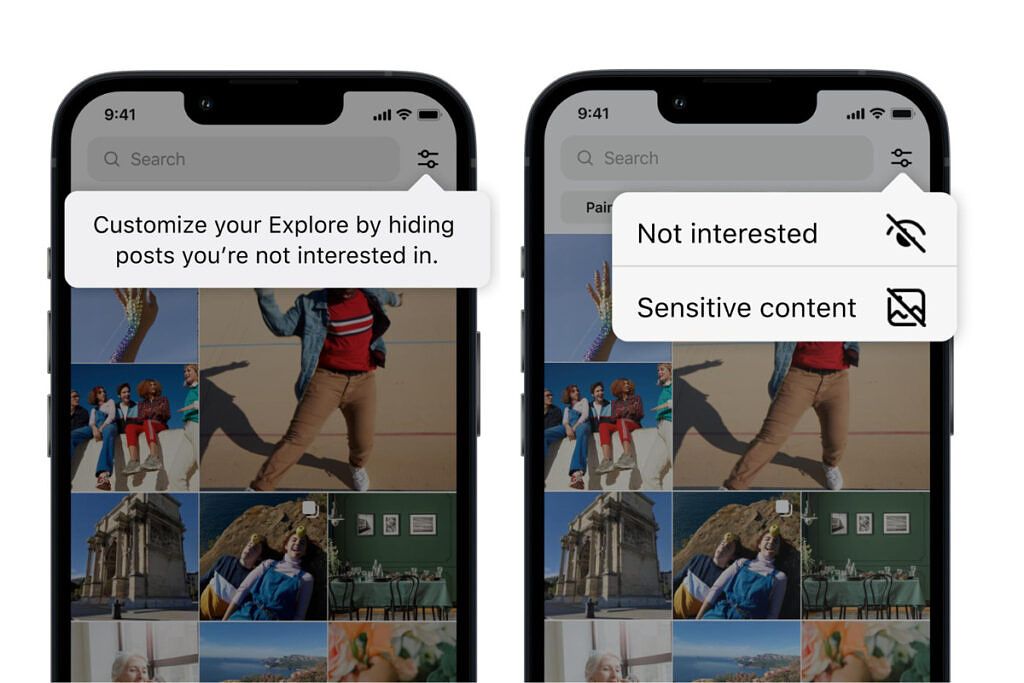
Instagram has been busy as of late, adding lots of new features to its platform. While the company currently does have a way to customize what ends up on the Explore page, it doesn’t have a precise way to refine the images and videos that pop up daily. Thankfully, the firm has announced that it is testing a couple of new ways to hopefully allow users to improve the content on the Explore page in the future.

Instagram Feed options

The new test will allow users to refine their feed further and, hopefully, have recommended content delivered that is more in line with what they are looking for. Users can currently refine their feed by selecting content and marking it as “Not Interested.” While this is a great solution, sometimes it can be slow if several items need to be marked at once. The new test allows users to mark multiple items at once, making it faster and more efficient to filter out content they don’t want to see. Furthermore, Instagram will take things a step further, allowing users to filter out suggested content using words, phrases, or even emoji found in the caption and hashtags. Currently, the more granular filtering option is not live in the test. Instagram did not offer a timeline for when it would become available.

Instagram Feed options

Recently, Instagram has put a lot of focus into creating a safe place for teens. Last week, it updated the Sensitive Content Control, showing less sensitive content by default to teens 16 years and under. The firm has also introduced age verification in the United States, requiring users to provide a valid form of identification when signing up for Instagram. But, being able to filter content will take things to another level. If this kind of filtering goes live, it could become an extremely powerful tool for the platform and its users.


Source: Facebook

The post Instagram will begin testing a potentially powerful content filtering tool appeared first on XDA.


from XDA https://ift.tt/2E0BHgb
via IFTTT

lundi 29 août 2022

AMD Ryzen 7000 launch date is official, promises to be the best gaming chip

At CES back in January, AMD announced that while Ryzen 6000 laptops were on the way, desktops were going to skip that generation and go right to Ryzen 7000. While various details have been announced along the way, the company announced all of the details today. You’ll be able to buy any of four SKUs on September 27, ranging from $299 to $699.

Starting with some of the highlights, AMD says that it outperformed its goals for Ryzen 7000. It was looking to boost IPC (instructions per clock) by 8-10%, and it actually got to 13% over Zen 3. The firm is also saying that the new Ryzen 9 7950X, which sits at the top of the lineup, offers 57% better content creation performance than an Intel Core i9-12900K.

“The AMD Ryzen 7000 Series brings leadership gaming performance, extraordinary power for content creation, and advanced scalability with the new AMD Socket AM5,” Saeid Moshkelani, senior vice president and general manager, Client business unit, AMD. “With the next generation Ryzen 7000 Series Desktop processors, we are proud to uphold our promise of leadership and continuous innovation, delivering the ultimate PC experience for gamers and creators alike.”

As you’d expect, AMD brought out the benchmarks

That’s not all though. AMD compared its processor gen-over-gen, saying that the Ryzen 9 7950X has a 32% boost in DOTA 2, a 35% boost in Shadow of the Tome Raider performance, a 6% increase in Borderlands 3 performance, and a 13% increase in CS:GO performance over the Ryzen 9 5950X.

AMD Ryzen 7000 family

AMD didn’t just compare its new processors to Intel in content creation. It says that its Zen 4 cores are the best for gaming, a somewhat common claim for new desktop processors that Intel is sure to make when it launches 13th-gen next month. It pointed to Geekbench 5.4 single-thread scores. Where a Core i9-12900K came in at 2,040, a Ryzen 5 7600X came in at 2,175, and the Ryzen 9 7950X came in at 2275.

The company went so far as to say that the Ryzen 5 7600X, on average, offers 5% better gaming performance than a Core i9-12900K.

But what about everything else?

Obviously, speeds and feeds just tell you about, well, speeds and feeds. The Ryzen 9 7950X offers 16 cores with 32 threads, a boost clock of up to 5.7GHz, a total cache of 80MB (the L2 cache has been doubled), and a 170W TDP. Yes, that’s a significant boost in TDP, but AMD is promising a big boost in efficiency.

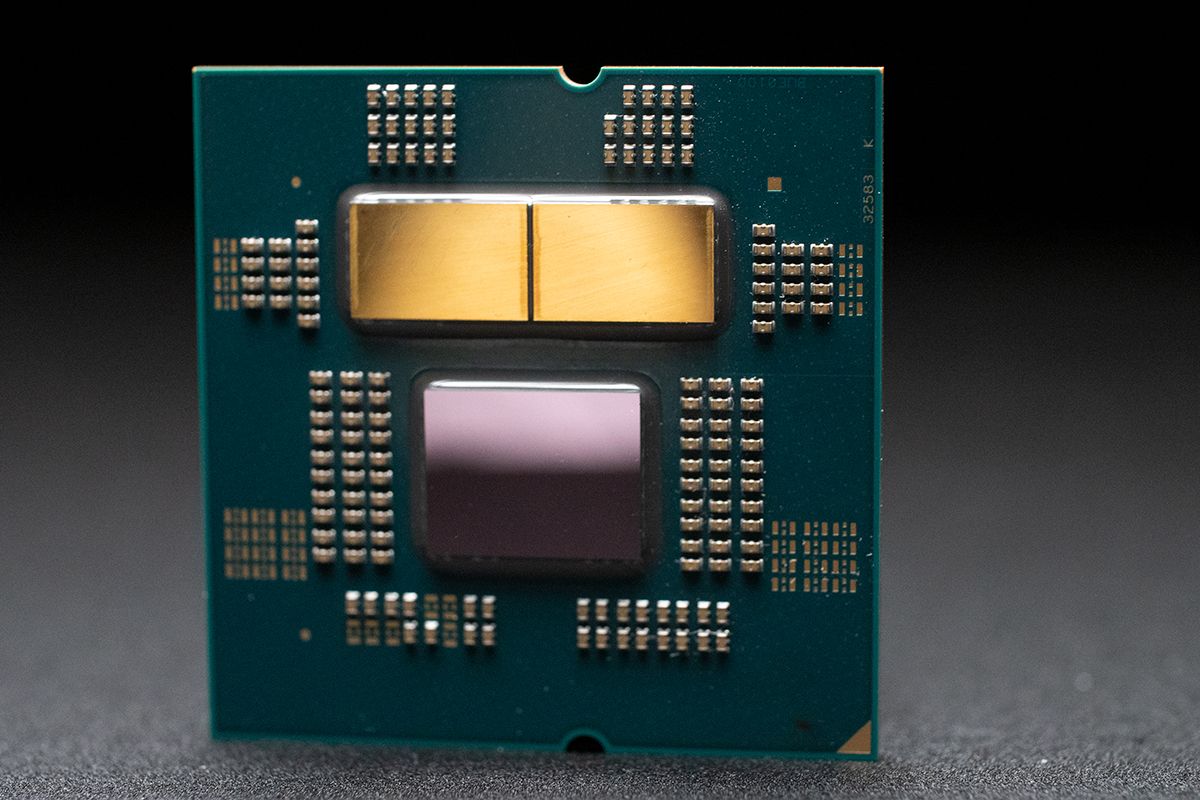
AMD Ryzen 7000 processor

With the new TSMC 5nm process as part of Zen 4, AMD has shrunken down the Core + L2 area to 3.84 square millimeters, while Intel’s is 7.46 square millimeters on the Intel 7 process (Alder Lake). With that, AMD is promising 1.47 times the performance per watt of Intel, a company promising to have the industry lead in performance per watt by 2025.

Model Cores/Threads Boost / Base Frequency Total Cache PCIe TDP
AMD Ryzen 9 7950X 16C / 32T Up to 5.7 / 4.5GHz 80MB Gen 5 170W
AMD Ryzen 9 7900X 12C / 24T Up to 5.6 / 4.7GHz 76MB Gen 5 170W
AMD Ryzen 7 7700X 8C / 16T Up to 5.4 / 4.5GHz 40MB Gen 5 105W
AMD Ryzen 5 7600X 6C / 12T Up to 5.3 / 4.7GHz 38MB Gen 5 195W

Other important improvements are support for DDR5 memory and PCIe 5.0, both of which are already supported by Intel’s latest generation of chips. One key difference, however, is that Ryzen 7000 only supports DDR5 memory. The company says that after so much time, DDR4 is at the end of its life.

It’s fair to say that the death of DDR4 has been dragged out a bit, thanks to component shortages that kept DDR5 prices high, and the fact that in this early stage of DDR5 evolution, there wasn’t that much of an advantage. The advantage simply wasn’t enough to cover the difference in price.

AMD sees that as changing, so it’s going with DDR5. It’s also announcing Expo memory, which is optimized for AM5 boards and can be overclocked. These are going to arrive from companies like ADATA, Corsair, Kingston, and more in November. There will be more than 15 kits available at launch, coming in at speeds of up to DDR5-6400.

The new AM5 platform, guaranteed to be used through at least 2025

Unlike Intel, which seems to rarely allow a CPU socket to last more than two generations at this point, AMD has boasted future-proofing as one of its value propositions. The AM4 socket has been around for over five years and lasted through five CPU architectures. It actually predates the Zen architecture and the Ryzen brand.

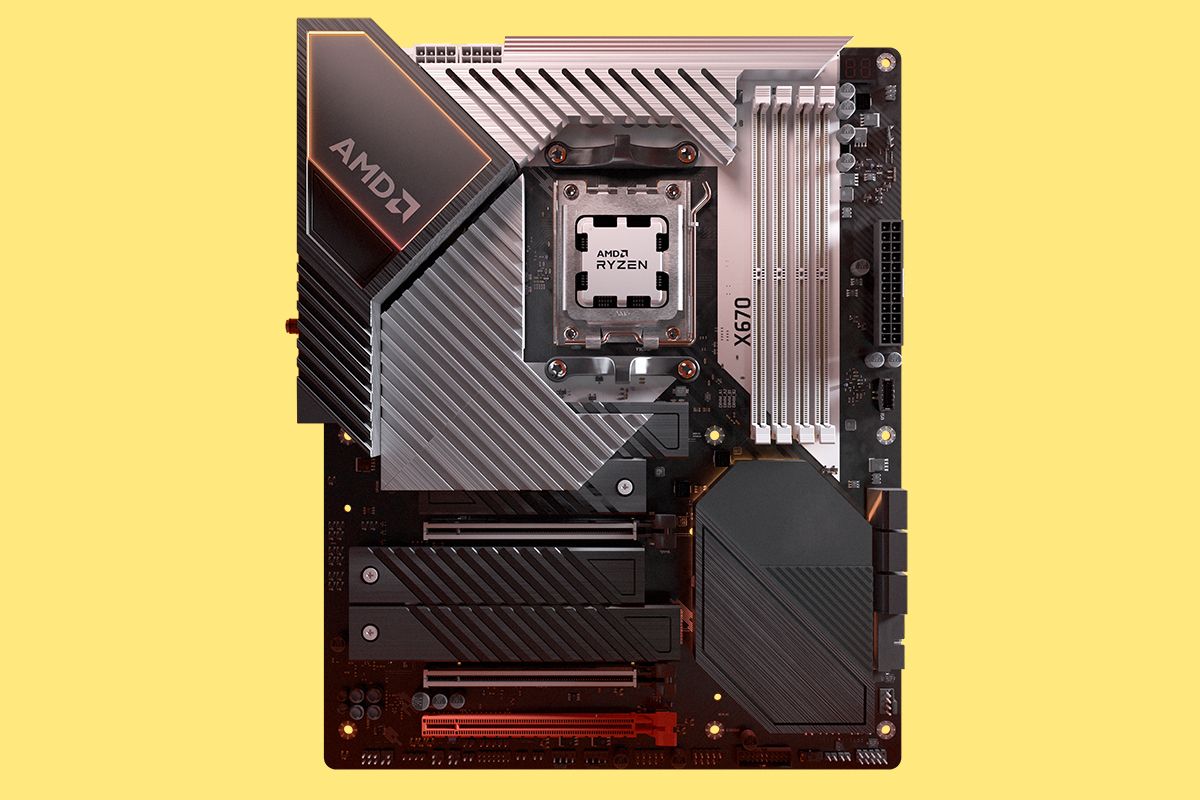
AM5 motherboard with AMD Ryzen processor

It’s time for AM5, which includes a 1718 pin LGA socket, including up to 230W socket power delivery. Most importantly though, it’s meant to be future-proofed, including DDR5 and PCIe 5.0.

PCIe 5.0 offers double the bandwidth of its predecessor. That means faster SSDs, which is great when we’re talking about things like DirectStorage. But along with other things, it can get you faster graphics. AMD has four platforms out of the gate: X670, X670 Extreme, B650, and B650 Extreme. They all offer PCIe 5.0 storage, but the Extreme options also offer PCIe 5.0 graphics.

The AM5 platform does support AM4 coolers, so while you’ll have to swap out your board, you should be able to keep your cooler.

As for how long AMD is planning to use AM5, it should be for at least three more years. The firm is promising to use the new platform until at least 2025.

AMD Ryzen 7000 pricing and availability

You’ll be able to pick up an AMD Ryzen 7000 processor beginning on September 27. There are four SKUs, with the following pricing:

Ryzen 9 7950X Ryzen 9 7900X Ryzen 7 7700X Ryzen 5 7600X
$699 $549 $399 $299

AMD Ryzen 7000 processors with the company’s new 3D V-Cache are going to be available later in 2022, but there’s no specific date yet.

The post AMD Ryzen 7000 launch date is official, promises to be the best gaming chip appeared first on XDA.


from XDA https://ift.tt/DhksSMe
via IFTTT

One UI 4.1.1 for the Galaxy Tab S8 series brings new multitasking features

Samsung debuted One UI 4.1.1 based on Android 12L with the recently-launched Galaxy Z Fold 4. The new software release included optimizations and features for large-screen devices, and it’s now finally available for Samsung’s flagship Galaxy Tab S8 series.

The One UI 4.1.1 update for the Galaxy Tab S8, Galaxy Tab S8 Plus, and Galaxy Tab S8 Ultra is currently rolling out to users in Europe and South Korea (via Sammobile). It includes the new Taskbar feature that Samsung showcased at its Galaxy Unpacked event earlier this month. It lets you quickly switch between frequently used apps or open apps in split-screen mode or as a pop-up window. You can also use it open frequently-used app pairs in split-screen mode. In addition, One UI 4.1.1 also includes a new two-finger gesture to help users quickly switch between fullscreen and split-screen views.

Samsung Galaxy Tab S8 Ultra One UI 4.1.1 update changelog in German.

Via: Sammobile

Along with these multitasking improvements, One UI 4.1.1 also includes a new option to set custom call backgrounds for contacts. Furthermore, the updated My Files app in the release lets users search for information within files. The tablets also get support for a new text scanning feature that lets users copy text from images and share it with others. You can also use it to translate the copied text to Chinese, French, German, Italian, Korean, Portuguese, and Spanish.

The release also includes a new version of the Samsung Internet browser app, which brings drag-and-drop support to help users rearrange favorite websites and the ability to sort bookmarks in folders. Lastly, One UI 4.1.1 for the Galaxy Tab S8 series includes the Android security patches for August 2022.

The Android 12L update is available for both the Wi-Fi and cellular variants of all three tablets, and it measures slightly over 2.3GB. If you haven’t received the update prompt on your Galaxy Tab S8, you can manually check for it by heading over to the Software update section in the device settings.


Via: Sammobile

The post One UI 4.1.1 for the Galaxy Tab S8 series brings new multitasking features appeared first on XDA.


from XDA https://ift.tt/Zt8H6BS
via IFTTT

HomePod Mini: An orange-sized Apple that complements my audio diet

For a very long time, I didn’t really care about smart home appliances. After all, the technologies we depend on sometimes don’t work as expected. The more technologies a device packs, the more likely it’ll glitch or malfunction. Of course, there are reputable companies with solid appliances out there. Nonetheless, I had been sticking to old-school lightbulbs and speakers. Despite my enthusiasm towards Apple products, the Apple TV and HomePod are two device categories I had been ignoring.

HomePod Mini: How it emerged on my desk

HomePod Mini Space Gray

HomeKit-enabled devices are hard to come by in Turkey — where I live. There are smart appliances with their own dedicated mobile apps and Google Assistant support. However, if I’m building a smart home, I’d personally want it to be wholly accessible from the Apple Home app. I don’t want to go through mazes to toggle a light switch. That would defeat the entire purpose of an intuitive, smart home.

I had been using a JBL Go 3 for my louder music-listening sessions for a year. For those unfamiliar with it, it’s compact, water-resistant, wireless, and rechargeable. I’d place it in the kitchen when I’m cooking, in the bathroom during my shower singing shows, and on my desk when I’m working. Its portability was ideal, but there were two main annoyances — it not being always on, and me needing to manually connect it to one of my devices every time I want to use it.

Lastly, I recently bought a HomeKit smart bulb. While my mighty iPad currently acts as a HomeKit bridge, it won’t when I make the upgrade to Matter in a few months. When Matter is widely adopted, the interconnected possibilities will be endless. So my bridge options from the company would be either an Apple TV or a HomePod. Considering I don’t use (or like) TVs at all, the HomePod Mini remained my only option.

Design: Mini is an understatement

No matter how many size comparison photos/videos you check before you buy it, the HomePod Mini is even smaller than you’d think. This thing is tiny — like, really tiny. It quite literally is the size of an orange. The best part, though? Size doesn’t actually matter here. It’s loud, clear, and a joy to look at. Obviously, I went for the Space Gray color option — subjectively, the only right shade. While it doesn’t pop out on my black desk, next to my other Space Gray and Midnight devices, it still has a prominent personality to it.

HomePod Mini Space Gray

The HomePod Mini is wrapped in a mesh fabric that certainly makes it more human and less of a soulless device. On its top, there’s a touch screen that lights up when you trigger Siri or are playing audio through it. On its side, towards the very bottom, there’s a color-matched, irremovable braided power cord. That’s pretty much it.

Brain: Smarter than your iPhone

So, as you might’ve guessed — Siri powers the HomePod Mini. While it’s the same Siri that lives in your new iPhone or great Mac, it actually works better. For starters, it recognizes the Hey Siri hot word significantly faster. The touch display instantly lights up when you trigger it. That’s not to mention that it detects my voice and executes my commands accurately, even when I’m in another room. The microphone sensitivity is incredible. Before buying the HomePod, toggling my smart bulb would take around three seconds when using Siri on my iPhone. On the smart speaker, the wait time is virtually zero.

HomePod Mini Fireplace Sounds

That’s not to mention that you get certain exclusives — such as individual voice recognition for those sharing it with others, and white noise support. The former lets you make personal requests — such as sending one of your contacts a message — without announcing who you are beforehand. HomePod’s Siri can distinguish between different people’s voices and personalize the experience accordingly. As for the latter, you can ask it to play:

  • White Sounds
  • Stream Sounds
  • Rain Sounds
  • Ocean Sounds
  • Night Sounds
  • Forest Sounds
  • Fireplace Sounds

It will then play the respective sounds indefinitely. It’s a neat feature for those who can’t focus or sleep in a quiet environment.

Controls: HomePod Mini is the epitome of Apple’s tight ecosystem

Every year during WWDC, I wait for the Cupertino firm to announce Apple Music’s equivalent to Spotify Connect. How a company with an ecosystem as tight fails to deliver this basic continuity feature is beyond me. No, iOS 16, iPadOS 16, and macOS Ventura still don’t support that. When streaming Apple Music on the HomePod, it’s a different story, though. You get to control the playback and queue from any of your compatible iCloud devices.

HomePod Mini Music Continuity

So I can start a music session though the speaker’s Siri, then skip through the queue on the iPad Lock Screen player. I can then change the volume using my iPhone’s Control Center. That’s not to mention being able to hand off a queue by bringing the iPhone close to the HomePod. It blows my mind how a relatively insignificant implementation can bring me this much joy. This only makes me want HomePod-independent Apple Music continuity even more.

If you’d rather not use other iDevices to control the HomePod, you still can use the touch screen and Siri for that. Tapping the screen once acts as a play/pause button (or volume control if you aim at the plus/minus buttons). Touching and holding the screen triggers Siri — if you’d rather not use the hot word. Tapping twice skips to the next track, and, similarly, tapping thrice skips back. Of course with Siri you get to do more, such as asking it to play a certain playlist, album, song, etc.

Sound: Not so Mini

HomePod Mini Space Gray

I’m not an audiophile. There, I’ve said it. Despite that, I do listen to music for around five hours every day. What I personally appreciate in speakers is loud bass. The listening experience becomes more immersive when it’s prominent. The HomePod Mini meets and surpasses my expectations in this department. For a speaker this small, I still am surprised by how clear and loud it can get, too. What’s more mind-blowing, though, is that it still catches the Hey Siri hot word — even when you’re blasting deafening tracks. To avoid interrupting your listening session, it continues playing audio in the background gently, while you talk to the virtual assistant. The way its volume transitions is smooth and, consequently, satisfying.

The HomePod isn’t for every home

Apple’s HomePod Mini can be a perfect smart speaker for many users, including me. That’s because I meet very specific conditions, though. A significant portion of people might find it lacking or unsatisfactory. Those who use Apple products almost exclusively will love how seamlessly it works with all of their devices. You set it up once on a single device, and it becomes an available AirPlay output everywhere. It also supports lossless and Dolby Atmos playback, making it a decent smart Apple speaker at $99. That’s not to mention that it’s fully integrated into Notes, Reminders, Messages, etc.

For basic commands — like controlling music playback, setting timers, asking about the weather, etc. — Siri manages just fine. Google Assistant is objectively smarter than Apple’s assistant. However, the Cupertino overlord has been improving it with almost every major, annual OS release. In my case, I just need a speaker that is always on and ready. That’s in addition to an assistant to control my light’s color and brightness, plus potential smart appliances in the future. The HomePod Mini does that — making it one of the best recent additions to my room.

    Apple HomePod Mini
    The Apple HomePod Mini is an affordable, Siri-enabled speaker that offers plenty of neat smart features. It caters to a very particular group of users, though.

Do you depend on a HomePod? Why or why not? Let us know in the comments section below.

The post HomePod Mini: An orange-sized Apple that complements my audio diet appeared first on XDA.


from XDA https://ift.tt/1o2PAgG
via IFTTT